

Convert your GNU / Linux into an Operating System suitable for Digital Mining
In this, my second publication of the month, I bring you a publication about which minimum recommended package should have its own GNU / Linux System, to optimize it and be able to dedicate it to Digital Mining, in other words, for the generation of Cryptocurrencies (Cryptocurrencies).
Below we will detail the command commands with some packages that, depending on the Distribution and version of your own GNU / Linux Operating System, may not be exactly the same, so you will have to find and change the names of those that are necessary:
Packages to perform optimizations to obtain a Digital Mining Operating System
Optimize the kernel:
root @ machine: / directory / subdirectory # sudo apt install build-essential linux-headers - $ (uname -r) dkms
Manage compressed files:
root @ host: / directory / subdirectory # sudo apt install arj bzip2 lhasa lzip p7zip p7zip-full p7zip-rar rar unace unrar unrar-free unzip xz-utils zip zoo
Adapt the Equipment Hardware:
root @ computer: / directory / subdirectory # sudo apt install acpi acpitool acpi-support fancontrol hardinfo hwdata hwinfo ibus ibus-m17n inxi irqbalance iucode-tool laptop-detect linux-firmware lm-sensors lshw lsscsi smart-notifier smartmontools sysinfo xsensors
root @ host: / directory / subdirectory # sudo apt install intel-microcode # Only for INTEL Processors
root @ machine: / directory / subdirectory # sudo apt install amd64-microcode # Only for AMD Processors
Then execute the command commands:
root @ host: / directory / subdirectory # sudo sensors-detect
And press ENTER in all options.
Then execute the command command:
root @ host: / directory / subdirectory # sudo chmod u + s / usr / sbin / hddtemp
Test as User the hddtemp command:
root @ host: / directory / subdirectory # sudo hddtemp / dev / sda
Packages to manage Video Cards:
Note: Only install in desktop computers with non-integrated AGP / PCI / PCI EXPRESS video card or mobile computers (Laptops) that present video problems or deficiencies:
Nvidia cards:
root @ host: / directory / subdirectory # sudo apt install linux-headers-`uname -r` xorg-server-source
root @ machine: / directory / subdirectory # sudo apt install nvidia-kernel-common nvidia-kernel-dkms nvidia-xconfig nvidia-settings nvidia-detect nvidia-smi nvidia-support
Then execute the command command:
root @ host: / directory / subdirectory # sudo nvidia-xconfig
Restart the System and test the result.
AMD cards:
root @ machine: / directory / subdirectory # sudo apt install fglrx-driver fglrx-control
Restart the System and test the result.
INTEL cards:
root @ machine: / directory / subdirectory # sudo apt install intel-gpu-tools i965-va-driver
Restart the System and test the result.
Note: If at install the proprietary video packages and do not start the graphical environmentOr, you can solve the problem by deleting the contents of the file /etc/x11/xorg.conf and rebooting.
Packages for managing PYTHON-based applications:
sudo apt install python-pip python-psutil python-twisted
Packages for managing QT5-based applications:
sudo apt install qt5-default qt5-qmake qtbase5-dev-tools qttools5-dev-tools libqt5websockets5
And Depending on the Distribution and Version of your Operating System:
sudo apt install libqt5core5
Or this other:
sudo apt install libqt5core5a
Packages for the management of Cryptocurrency Miners (Miners) and Wallets Programs:
sudo apt install autoconf automake autotools-dev build-essential byobu g ++ gcc gcc-6 g ++ - 6 git git-core libboost-dev libboost-all-dev libcrypto ++ - dev libcurl3 libdb-dev libdb ++ - dev libevent-dev libgmp-dev libgmp3- dev libhwloc-dev libjansson-dev libmicrohttpd-dev libminiupnpc-dev libncurses5-dev libprotobuf-dev libqrencode-dev libqt5gui5 libqtcore4 libqt5dbus5 libstdc ++ 6 libssl-dev libusb-1.0-0-dev dev libtool-opencludev ic-dev libtool-opencludev dev openssl pkg-config protobuf-compiler qrencode qttools5-dev qttools5-dev-tools
And these libraries:
sudo apt install libdb ++ - dev libdb5.3 ++ libdb5.3 ++ - dev
Or these others:
sudo apt install libdb ++ - dev libdb4.8 ++
Note: For 4.8 libraries you can install the Bitcoin repositories available by installing the ppa: bitcoin / bitcoin
sudo add-apt-repository ppa: bitcoin / bitcoin sudo apt-get update sudo apt-get install -y libdb4.8-dev libdb4.8 ++ - dev
o Download them from:
http://ppa.launchpad.net/bitcoin/bitcoin/ubuntu/pool/main/d/db4.8/
Both Ubuntu and some Ubuntu-based Distros may need install libboost libraries not corresponding to its version, libraries such as: «libboost-filesystem1.58.0","libboost-program-options1.58.0","libboost-system1.58.0" Y "libboost-thread1.58.0»That are typical of Ubuntu 16.04 (Xenial). They must be downloaded and installed with the command order: "Sudo dpkg -i libboost * .deb".
And in other cases, the installation of the packages "cmake" or "libcurl4" and "libcurl4-openssl-dev" may be required., which require uninstalling the library "Libcurl3" and those applications that use it. Another useful package for digital mining tasks via terminal (console) is «Screen». Install it if you consider it necessary.
After this you can finish by executing the following commands for maintenance and optimization of the entire Operating System:
root @ host: / directory / subdirectory # sudo apt update; sudo update-apt-xapian-index; sudo aptitude safe-upgrade; sudo apt install -f; sudo dpkg --configure -a; sudo apt --fix-broken install
root @ host: / directory / subdirectory # sudo localepurge; sudo update-grub; sudo update-grub2; sudo aptitude clean; sudo aptitude autoclean; sudo apt-get autoremove; sudo apt autoremove; sudo apt purge; sudo apt remove
root @ machine: / directory / subdirectory # sudo rm -f /var/log/*.old /var/log/*.gz / var / log / apt / * / var / log / auth * / var / log / daemon * / var / log / debug * / var / log / dmesg * / var / log / dpkg * / var / log / kern * / var / log / messages * / var / log / syslog * / var / log / user * / var / log / Xorg *
root @ host: / directory / subdirectory # sudo update-initramfs -u
You can now continue installing and / or running each Mining Software and Digital Wallet of your preference!
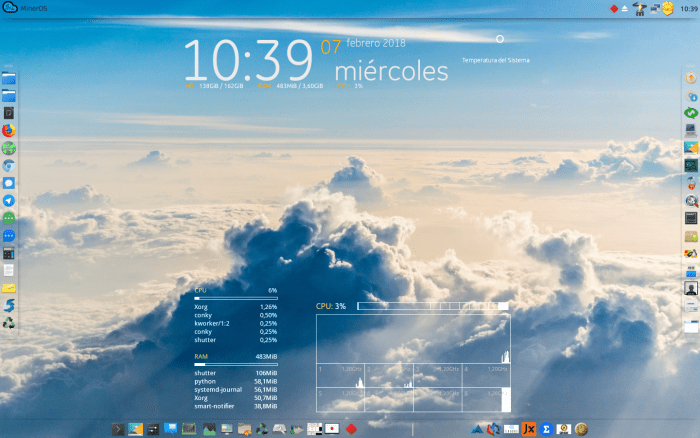
MinerOS / MilagrOS: Digital Mining Operating System
I hope these little tips guide them within their own Distro and version so that they can optimize it and adapt it to the Digital Mining of Cryptocurrencies. And in case you do not want to do these and other optimizations, download for free or under donation the GNU / Linux MilagrOS Operating System, formerly called Miners from its official website, by clicking here: Tic Tac Project | Distros.
At the risk of looking like a troll. We are charging the planet enough with so much industry and so much CO2 emission to produce energy for an infinity of things, but we charge it based on finding numbers that solve a problem and that can go to take fresh wind when quantum computing dawns on me. it seems absurd. This should not be encouraged.
Troll colleague ... I totally agree with you, although there is a little known alternative and I don't know if it is so viable. https://www.gridcoin.us/
If there are many good things (codes for scientific and humanitarian purposes) in some cryptocurrencies. Legend has it that many of the cryptographic codes that are deciphered by miners and for which they receive rewards with cryptocurrencies are to feed, through distributed computing at a global level, a future artificial intelligence (AI) in development.
Hahaha
Muahahaha… that would be Machiavellian cool.
You are absolutely right, but Humanity is congenitally "as it is" and therefore, it will not change because the opposite is a better alternative to survive, therefore digital mining is here to stay until something else drives the new fashion within the system ! And I only facilitate things, that is, for those who use GNU / Linux to learn.
!!! WTF¡¡
For ASIC miners (I have Antminer s9), you only need to install the latest stable version of Debian, without a desktop and the cgminer package and that's it.
For wallet I use Bitcoin core (Bitcoin-qt) which has an option to manage it from the console (CLI).
To mine with GPU I do not know the procedure.
Good article.
Thank you! Well, this article is more for those who already have their GNU / Linux running on their Computer and want to start mining and need to adapt their current Operating System.
What is mining? I know it creates a cryptocurrency, but in simple terms how does it do it?
I hope this article clarifies your doubts: https://www.oroyfinanzas.com/2015/02/que-mineria-bitcoin-por-que-necesaria/
Thanks Albert, for continuing to guide us.
You're welcome! It is a pleasure to socialize and democratize access to knowledge and technical expertise!
How long can you earn something from a bitcoin? As I understand it, as of today, it is no longer profitable to have miners, since what is earned in a year is not even the cost of a raspberry.
It certainly doesn't give much if you buy a PC and melt it down mining. But you can learn and not be out of the wave of Technological Finance, and if you do a few fractions of Crypto and Tradeas you can win a lot or lose everything! 🙂
Everything in the first comment, although it has logic is questionable, what people do not know is that there are already powerful alternatives, and even less expensive with better results; but, and why this is not made known ..
Well the answer is short: it is extremely complex. Minimum knowledge required that people do not have and I speak of the common denominator, which is people wanting to make a profit; does not want to have. Reason why there are these types of simple guides, ASICs and other devices that are in testing phases (methods based on machine learning and other AI technologies).
This snippet is for Gabriel, who asks about profitability:
Gabriel, this is a bit tricky to answer. Why?
It depends on factors such as electricity, regulations of your country (I speak in accordance with the laws of my country where having equipment is beginning to have taxes) electricity, internet expenses, maintenance and currency that you choose to mine.
Mining Bitcoin depends on the power you have, the more power, the more likely to have real benefits. To generate a Bitcoin, individually with your own machines, you would basically have to invest the cost of one to recover that Bitcoin, and hopefully produce another one. Why of this? Because the difficulty grows every day and requires more power every day. Now, if you choose another currency, things can vary a lot.
You do choose the GPU mined. Though. Perhaps the same is invested, the result is being much more profitable, currencies like monero, (and recently bytecoin was also) are consolidating and increasing in value.
You should have knowledge of multiple areas, technical, statistical and investment (tradding) or, and this is the one I recommend, enter mination clubs, yes, verifiable in blockchain.info.
Well, in short, I think, and without fear of being wrong, we will soon have no opportunity to have access to Bitcoin and many cryptocurrencies, unless we buy them.
Excellent comment.
Greetings Srkdos!
How do you do to run that program that I can't find anywhere
If you mean MinerOS this is its official website: https://proyectotictac.wordpress.com/mineros-un-gnu-linux-listo-para-minar/
Nice blog though.
If you want to make your blog more professional then contact me at the link below:
https://www.fiverr.com/mansoorahmed330/create-a-professional-wordpress-website-for-you
This page helped me a lot, I can configure my vps thanks to Windows Help
Wow
very interesting article
Thank you
https://www.rabato.com/es/carrefour
Greetings Rabato! Thanks for your comment.
it touches my balls how much shit advertising is on the web