We see horror and mystery stories everywhere. Reading in my RSS I find out that Canonical makes use of the CopyRight that has its logo to censor criticism towards Ubuntu, something that had never happened before.
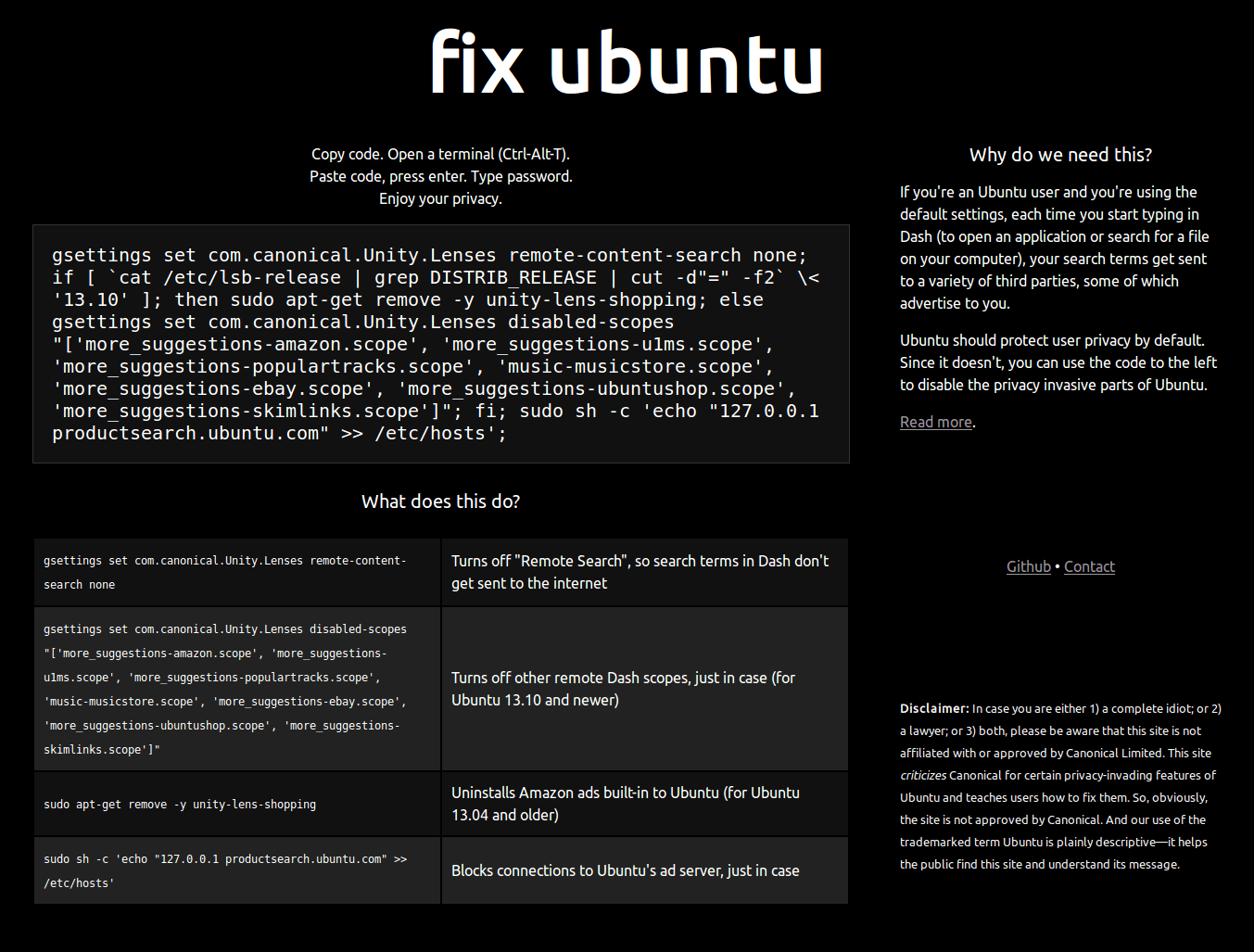
The story is the following, Micah Lee, website owner Fix Ubuntu, publishes a code to eliminate online searches that includes the new version of Unity and that according to many, violates their privacy.
What is the problem? Well what Micah Lee, used the name and logo of Ubuntu for your page, something that as many know, thousands of sites and blogs do.
But as the goal of Fix Ubuntu is to remove a functionality to Unity, which reports profits to Canonical, since they have prohibited it from using the logo, and even the word / name Ubuntu.
At the moment Micah has already removed the logo, but keeps the name, as well they explain here.
What do you think? For my part, I give Mr. Micah my +1000 for sharing and wanting to protect our privacy and Canonical, because he takes -1.
Script Execution
Basically all we have to do is open a terminal and run:
gsettings set com.canonical.Unity.Lenses remote-content-search none; if [`cat / etc / lsb-release | grep DISTRIB_RELEASE | cut -d "=" -f2` \ <'13.10 .1 ']; then sudo apt-get remove -y unity-lens-shopping; else gsettings set com.canonical.Unity.Lenses disabled-scopes "['more_suggestions-amazon.scope', 'more_suggestions-u127.0.0.1ms.scope', 'more_suggestions-populartracks.scope', 'music-musicstore.scope', 'more_suggestions- ebay.scope ',' more_suggestions-ubuntushop.scope ',' more_suggestions-skimlinks.scope '] "; fi; sudo sh -c 'echo "XNUMX productsearch.ubuntu.com" >> / etc / hosts';
What does this do? |
|
gsettings set com.canonical.Unity.Lenses remote-content-search none |
It deactivates «Remote searches», that is, the searches do not need the Internet |
gsettings set com.canonical.Unity.Lenses disabled-scopes "['more_suggestions-amazon.scope', 'more_suggestions-u1ms.scope', 'more_suggestions-populartracks.scope', 'music-musicstore.scope', 'more_suggestions-ebay.scope', 'more_suggestions-ubuntushop.scope', 'more_suggestions-skimlinks.scope']" |
Disable other Dash lenses that also access the Internet |
sudo apt-get remove -y unity-lens-shopping |
Uninstall the Amazon lens |
sudo sh -c 'echo "127.0.0.1 productsearch.ubuntu.com" >> /etc/hosts' |
Block connections to Ubuntu ad servers, just in case |
And for that, and yet another reason (literally slow .deb package processing), I haven't moved from Debian.
Not me from Windows 8
Ah good. Surely you would have already updated to 8.1.
At the moment I'm still in Windows 8. It works fine, I have "eliminated" the metro mode thanks to start8, Windows 8.1 is itself a new OS but only with improvements in metro (now modernui). There is no need, much less when everything works perfectly, if it were a service pack of course you would have already installed it.
It is not for being a curmudgeon, but the truth is that Windows 8, even if it has start8 or another similar plugin, I do not like. I still work with Windows Vista SP2 and Windows 7, so I have had no problems.
And by the way, Windows service packs will no longer be called SP1, but come as Linux updates (now, Windows 8.1 includes the start button that takes you to the awkward start panel).
But if I use Ubuntu, it is the only distro in which I can compile the driver for my usb WIFI network card both in live mode and installed the system. It's funny, but neither debian, nor fedora, nor opensuse, nor arch had software support installed to compile. Haha. And they give it advanced ...
What happens is that these functions are not installed by default, so those compilation utilities must be installed before starting to compile.
For my part, I use Debian because it processes .deb packages quickly and I have no complaints.
And is it only for Ubuntu or for its derivatives too? (Linux Mint, ElemetaryOS, etc)
Only for ubuntu.
I guess only for ubuntu since that affects Unity that I know of.
Now if they uncovered ... When they despair for money they forget the principles ...
I did not dare to make a post with this because I was already pissed off with the change in the youtube comments.
Vimeo is the voice. You don't trust YouTube too much anymore (unless you want to be a figuretti, of course).
For what I upload, I doubt it. I upload a lot of copyrighted material.
In ubuntu derivatives like lubuntu, kubuntu and xubuntu, can this script be applied? Or is it not necessary?
The package unity-lens-shopping existed in the first ubuntus with amazon, now it is within unity-scope, if it is removed, the unity menu may lose functionality. I would go to preferences> privacy> search, there the online functionalities are deactivated. then close the session and start again, enter the console and with «sudo netstat | less »see if connections to canonical still appear. At least in my case, it didn't bother again. Another thing that I would get are those suggestions that firefox makes about shortcuts to youtube. That is removed with the unity tweak tool.
PS: that "productsearch.ubuntu.com" to / etc / hosts is inefficient, because it is not the only address you use for query ( http://askubuntu.com/questions/135602/i-have-permanent-connections-to-canonical-servers-what-are-they-for-and-how-can ). Let it use «sudo netstat | less »while looking for something in unity to see what the connections really are,
What Canonical has done is perfect from two angles: it's perfectly legal and it's perfectly stupid. Of course, there is no shortage of lawyers who believe that the rest of us are a bunch of idiots and that we do not distinguish the difference between the legal, the moral and the ethical.
Those who maintain that Canonical has every right to sue anyone who uses the trademark registered by South Africans without their consent are correct, but they are wrong in reading the situation… the problem is not legal; it is a vested interest situation, which Canonical decided to disguise as a matter of court justice.
There are those who mistakenly compare this case with that of the Mozilla Foundation vs Debian, and they are wrong because from the outset the context and the reasons that originated the dispute are very different. Canonical is not asking for its logo image to be used correctly as Mozilla's claimed at the time, Canonical wants its brand NOT to be used and, on top of cynicism, not even the word ubuntu.
Canonical has already thrown their organic waste into the fan and they are going to get all that stinky dirt themselves, because it is going to be very difficult for many of us not to think that this is a personal vendetta. For me it is a clear case of censorship, although legal experts say that using the word «censorship» is technically and legally incorrect, because, as Elav says, hundreds, and perhaps thousands, of sites have used the Ubuntu logo image since years, everyone knows it and Canonical has never exercised property rights for any claim ... until now they have touched their interests.
I think, therefore I exist.
Possible translations of the term Ubuntu into Spanish:
"Humanity towards others"
"I am because we are"
"A person becomes human through other people"
"A person is a person because of other people"
«Everything that is mine is for everyone»
«I am what I am based on what we all are»
"Belief is a universal link of sharing that connects all of humanity."
Modesty
Empathy
Excellent. The Mozilla vs Debian context was different, because Mozilla's terms were incompatible with Debian's free software guidelines. From there, to avoid more unnecessary complaints, they forked Firefox and called it Iceweasel as the antithesis of visual identity (in addition, the FSF was the one who created the name Iceweasel, but since they wanted to avoid more complaints, they renamed their Firefox fork as GNU IceCat), in addition to dispensing with trivial functions such as asking if you want to send your data to improve the quality of the browser (at this point in which the paranoia has intensified thanks to the NSA / PRISM case, who wants to send your data anonymously »?).
I subscribe to everything. Excellent your comment.
And they said no.
Let's see with what face those who defended canonical appear when accusing others of being the tea party.
Those who say that the canonical CLA has no ill intentions either.
And in the same way, those who say that calling the entire OS Linux © has no problem.
Simply, what they did with putting the lenses in Unity is simply generating migraines to users.
Even Nemopunk and Google Desktop Search are more functional in that regard, so I realize that every time I am convinced that Ubuntu is getting worse.
I have nothing against Ubuntu, it seems to me a good distribution, in an excellent server version, And without counting the fans (who are not exclusive to Ubuntu) I also like its community, what I do not like is canonical and how do I know? manages, internally with its CLA and abroad with communication based on lies, unfulfilled promises and claims to those who do not support them to develop solutions that in practice are not feasible to implement in other distributions.
Truth be told, the only thing I'm really against Ubuntu is its slow processing of .deb packages. The rest has a solution.
Mark sinks faster than he sucks.
I remembered the real Microsoft slogan: "Ubunsoft: You Belong To Us" hahaha!
You had not told me about this Briz, It is a real disappointment, that something good ends up giving the buttocks to the usual financial cartel. There is never a shortage of pennies that are sold. I'm definitely going to have to approach linuxmint.
I told them I was going to change and I already did, also my equipment is working much more fluidly in mint. My internet connection is disconnected less since the router is a little removed. The file sharing has higher transfer rates than in ubuntu, even the installation is new. If I can say in favor of the canonical work that I learned linux through ubuntu, in fact I hardly use wl win, more than just to play games. And I know that my change in addition to being battling with viruses was that "winshit" monopolizes 20% of the bandwidth of your internet service and does not say why. Also in a documentary that I was watching a few years ago (5 years) it is that all the software that did not lend itself to espionage issues was being pushed aside, and the one that was provided was receiving support to be more popular. Now that Snowden has uncovered the shit, we see that many companies agreed to allow this type of act and awarded them a "ticket." Not to mention, the old men said: "Necessity has the face of a heretic.
Mark already regretted ... it's never too late ... But the stain is no longer erased and in our favor the lack of annoying ethics. And for canonical apologists, it's not whether the trademark or the rights to it. The issue is the total lack of ethics and tact towards a matter of simple criticism towards something no less perverse: permeating that without warning any attempt against our privacy.
Here is the canonical answer. It is not about censorship but about trademarks… ..the same is bullshit what they do.
http://blog.canonical.com/2013/11/08/trademarks-community-and-criticism/
Even the Mozilla Foundation is much smarter about its trademarks.
Good! Excellent contribution!
I believe that part of this had already been added to the guide "What to do after installing Ubuntu 13.10". It's essential.
When I read this article I couldn't help but think "RSM was right." This should be opt-in and not opt-out (which on the other hand is quite cumbersome because it mixes legitimate online searches - Wikipedia type - with commercial online searches - Amazon, for example).
I am quite concerned about Canonical's attitude on these issues… especially since they are supposed to develop the most popular Linux distro on desktops.
Hug! Paul.
The trademark wars are very old in Linux software (even Linux is one of them and had several lawsuits), RedHat could be mentioned against linuxiso.org, also against cheapbytes -and the well-known debian / mozilla-. But unlike all the previous ones, here they tried to use a technicality to block freedom of expression. This is not a license violation as fixubuntu was not pursuing any commercial purpose. It is as if they prohibited you in your blog or page to mention it. Bad Canonical move.
Ubuntu Epic Fail.
If Microsoft did something like that, we'd already be screwing at them… ~~
I am a faithful user of Ubuntu since its version 9.10, but this move with censorship intentions (don't screw me or I'll screw you) I will not forget it!
It just disgusts me.
I wish I had time to get into Debian ... many of us use Ubuntu every day just because it's easier ...
Greetings and congratulations for the post.
Ubuntu is not the only simple distro, there is Manjaro, Mandriva / Mageia, Opensuse and if you don't want to lose the habit of .deb you also have Linux Mint which is based on Ubuntu and is the same or simpler.
Come on, what there are are distros, and there are even many based on Ubuntu that respect your privacy more.
Greetings.
Too bad for Ubuntu, but somehow it has to earn money to support the development of the distro, and now with this data it only remains to think twice before installing Ubuntu and according to the need and the criteria of each one can take the decision to install or not. finally there are a lot of distros.
The incredible thing is that the community mixes things up. Half the world jumps to say "Stop criticizing Ubuntu, they are taking risks to bring Linux to the great audience." That comment (which is already a classic) fits perfectly into the "Wars of Mir" but not in this specific case. The terrible thing here is that what Ubuntu does goes against the values and philosophy of Free Software, using your brand to censor, is something very low and deserves widespread rejection.
While Debian has released restrictions on its logo. Bad for Ubuntu.
Then Ubuntu fanboy wonder why many of us do not tolerate Canonical in general…. all companies that seek to profit always end up doing something, Fedora with that clause ... Red Hat is a company, Canonical with this, SUSE with the agreement with M $, Linux Mint with that code that had changed in a music player, everything to earn money…. I acknowledge that to Debian, it is not accountable to anyone.
And all that's missing is Canonical's accountability to Debian.
Those are his traditions and must be respected…
I am not so bothered by the ubuntu search engine if not its attitude, although on the other hand it must be recognized that thanks to ubuntu GNU / Linux is gaining place in recent years, not everything is ubuntu of course but the great part. Now my question is, if they don't let us reform unity to our taste and palate, how free is Ubuntu?
And bringing something that bothers for a long time, because they removed the word linux from their url's.
Excellent post.
Mark apologizes
https://plus.google.com/116812394236590806058/posts/5jdibY5iR9b
In other words:
It is regrettable to see how every time Ubuntu has been oppressing the one who only selflessly seeks to help the other to customize the system.
From what I see if the direction that this distro is taking does not change I will be forced to migrate to another that does not have and / or does as much drama as Ubuntu.
Regards!
Ubuntu has already lost all my interest with the arrival of unity. Now he has also lost my respect.
What a shame how far ubuntu has gone so I switched to linux mint
Colleagues, Mark Shuttleworth personally apologized for this incident: http://www.markshuttleworth.com/archives/1299
According to him, it was an employee with less than a month at Canonical who sent such an email to the administrator of that site.
A abrazo.
interesting post! I am going to take it into account although I am moving away more and more from Ubuntu ...
How can it be verified that when executing the script it performed its function ?; I mean blocking or eliminating the online search and sharing such information among other things.
They are operating systems, and despite everything, Ubuntu is still more stable than Windows. Unfortunately it does not have the programs as there are in Windows. It is that Windows is not useful. They are the THIRD PARTY PROGRAMS that work on said "system"
A truth like a house: if more companies made software for GNU / Linux things would be very different. Many people think that companies make exclusive software for Windows because of its supposed quality and not because it is the OS that the majority uses or worse, that it is Microsoft itself that makes this software.