
Mozill recentlya company that is in charge of the development of the popular Firefox web browser, started developing a new browser for mobile devices project which has as key name "Phoenix".
The development of this web browser is still still in an early stage, as currently only about 5% of the expected development for the functionality of version 1.0 is found.
However, some models of the interface have already been published in which you can judge the characteristics of the new browser and the direction that the product development will take.
About Mozilla's new web browser
This new web browser "Fenix" is based on Mozilla's GeckoView engine and set of libraries, as well as all the apps and components, which is used to build the Firefox Focus and Firefox Lite browsers.
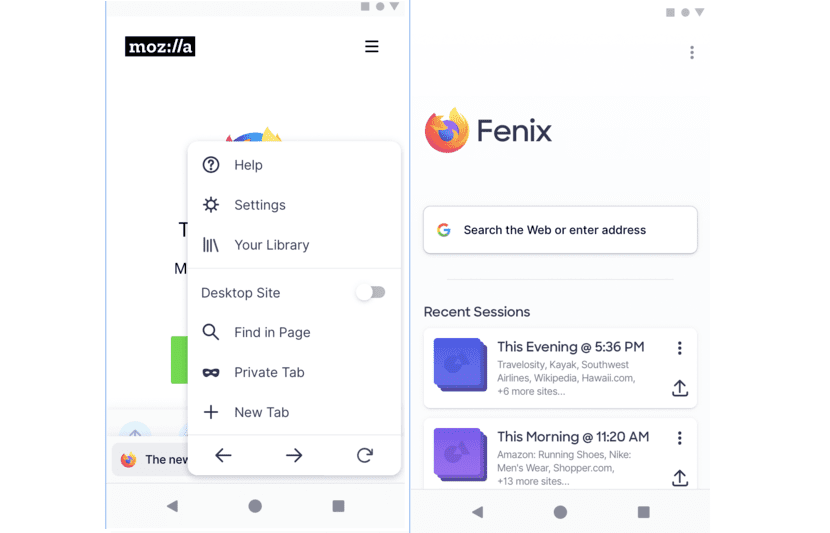
Judging by the available designs, developers of the Fenix interfaces are experiencing a delay with the relocation of the address bar and the control bar at the bottom of the screen, as well as providing an expanded menu, reminiscent of the classic version of Firefox desktop menu.
On models with the home page menu it is moved to the upper right corner and the address bar is displayed, combined with a global search function on the page.
Besides, a list of the open tab (s) or if the web page is not open yet is shown, in addition to that a list of the sessions that are grouped before the opening of the site is displayed in relation to the sessions for working with the browser.
After closing the open browser tabs, on the left they are automatically grouped into a session, which can then be viewed and restored.
Through the menu, the user can access the settings, the library (favorite pages, history, downloads, recently closed tabs), the choice of site display mode (display of the desktop version of the site), text search on a page, the transition to private mode opens a new tab and navigate between pages.
Fenix main features
The address bar is multifunctional instead of the URL it shows the title of the current page and has a universal key to quickly perform operations such as sending links to another device and adding the site to the list of favorite pages, which is used instead of bookmarks.
Clicking on the address bar the Fenix c web browserIt starts with full-screen prompts, offering relevant input options based on your history and search engine recommendations.
The screen also provides the user with quick-open link buttons from the clipboard and to obtain the address through QR code scanning.
They are not reflected in the layouts but are present in the list of feature plans such as built-in AdBlocker (a great point in favor), as well as a system of blocks to follow the user's movement, a download manager (like all modern browsers).
Another plus and important point of this new Mozilla web browser is that implements a separate panorama mode for tabs in a private mode, integration with external password managers can perform synchronization using QR-code devices for link exchange.
The functions shown do not, of course, represent the full range of functions, so you will still have other functions, such as protection tracking, an ad blocker, as well as the ability to save web pages for offline use. .
If you want to know a little more about the project you can visit the space on GitHub where they are carrying out development, as well as the page where they indicate the progress that is taking with this new web browser.
Another one? How many are you going to get? Normal Firefox, Beta, Nightly, Focus, Lite (before it was Rocket) which by the way is light but it has nothing or synchronization, and now this one. The Lite has blocker
No friend, that browser is for the normal Firefox