
I recently performed a migration of one of my laptops from Debian a Arch Linux and when configuring things related to network interfaces I found that the new startup standard for systemd I had made a change to the device names that I used to see on those interfaces.
Starting with the usual process I put in a terminal (which by the way uses rxvt unicode with zsh as the default console) «IP addr»Obtaining the following:

In this case we will configure the name of the network interface corresponding to the common cable with an RJ45 connector that we have at home to access the Internet. The first thing we see is that it takes by name enp0s4. This differs greatly from eth0 how much we have seen. What we will do is change the name of said interface to one that is more comfortable so to speak and that is easier for us to type in the console.
As a previous step we will type cat /sys/class/net/enp0s4/addres in the terminal to find out the MAC of the device. This will return a number of the type 000: 00: 00: 00: 00: 0 or simply copy the name of the MAC address that comes out with the command ip addr in the previous step. We must write it down because we will need it later.
After this we create an entry in the directory /etc/udev/rules.d/ in this way:
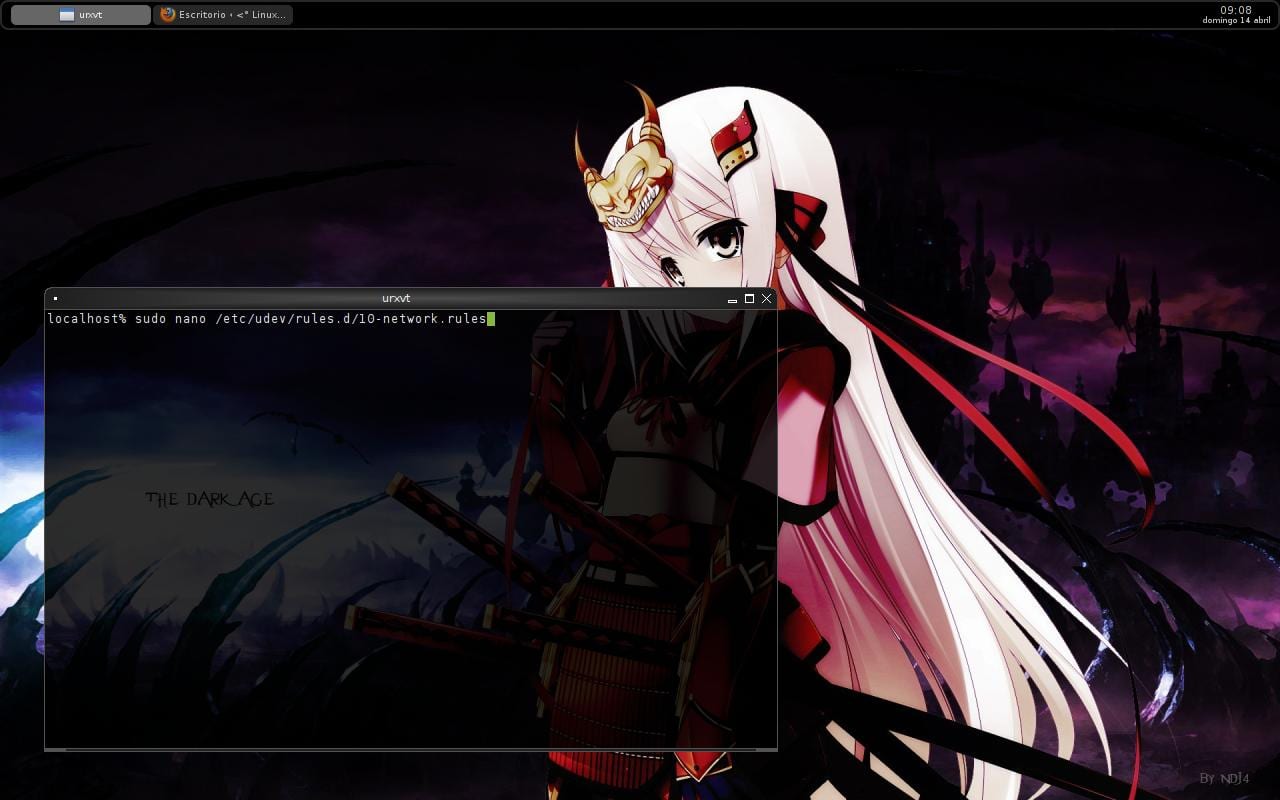
A simple text file named 10-network-rules that will serve as a processor before the udev standard. It is noteworthy that we put sudo because we need access to a file that requires that permission to act.
Once open we type in it:
SUBSYSTEM=="net", ACTION=="add", ATTR{address}=="00:90:f5:6e:83:57" NAME="internet"
staying this way in my case:
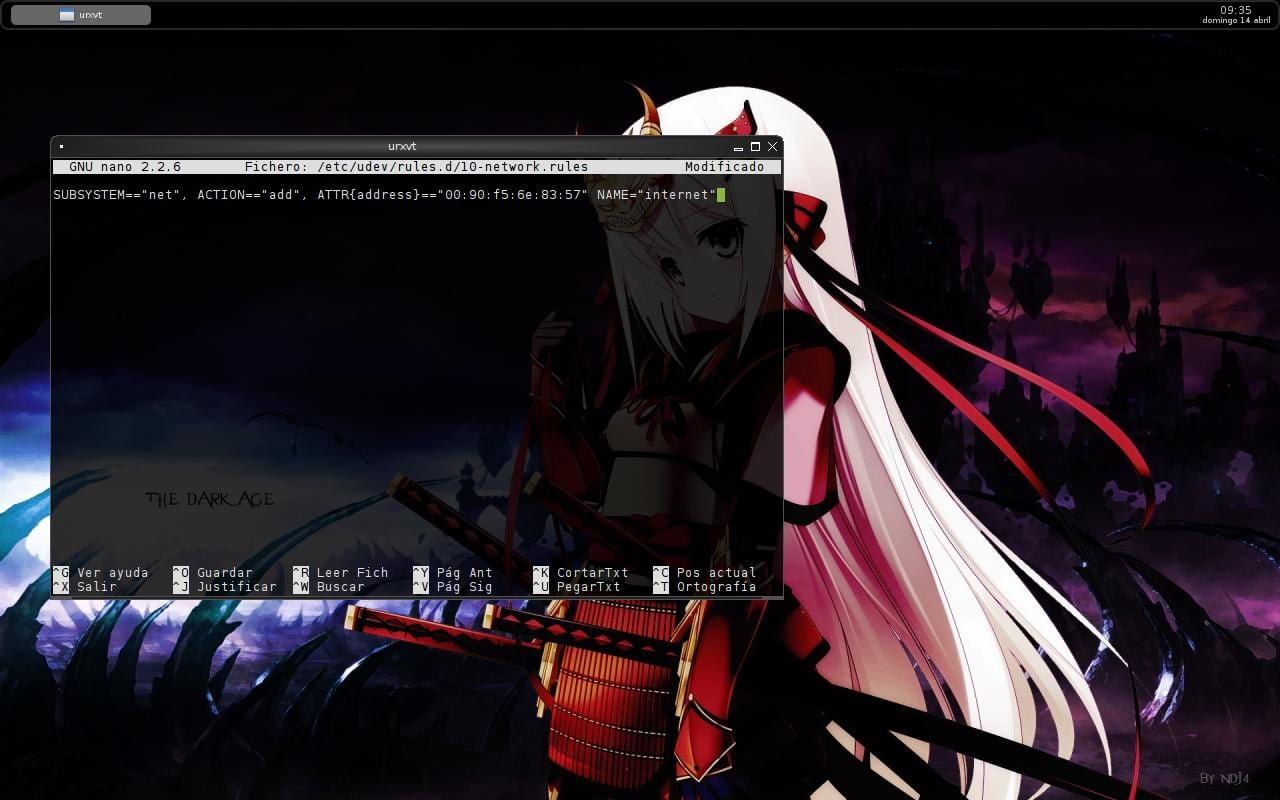
press the key combination CNTR + o to save the changes and CNTR + x to exit the editor (in this case I use nano but you can use whatever you want). Next, we restart the computer so that the changes take effect, obtaining after the reboot the following:
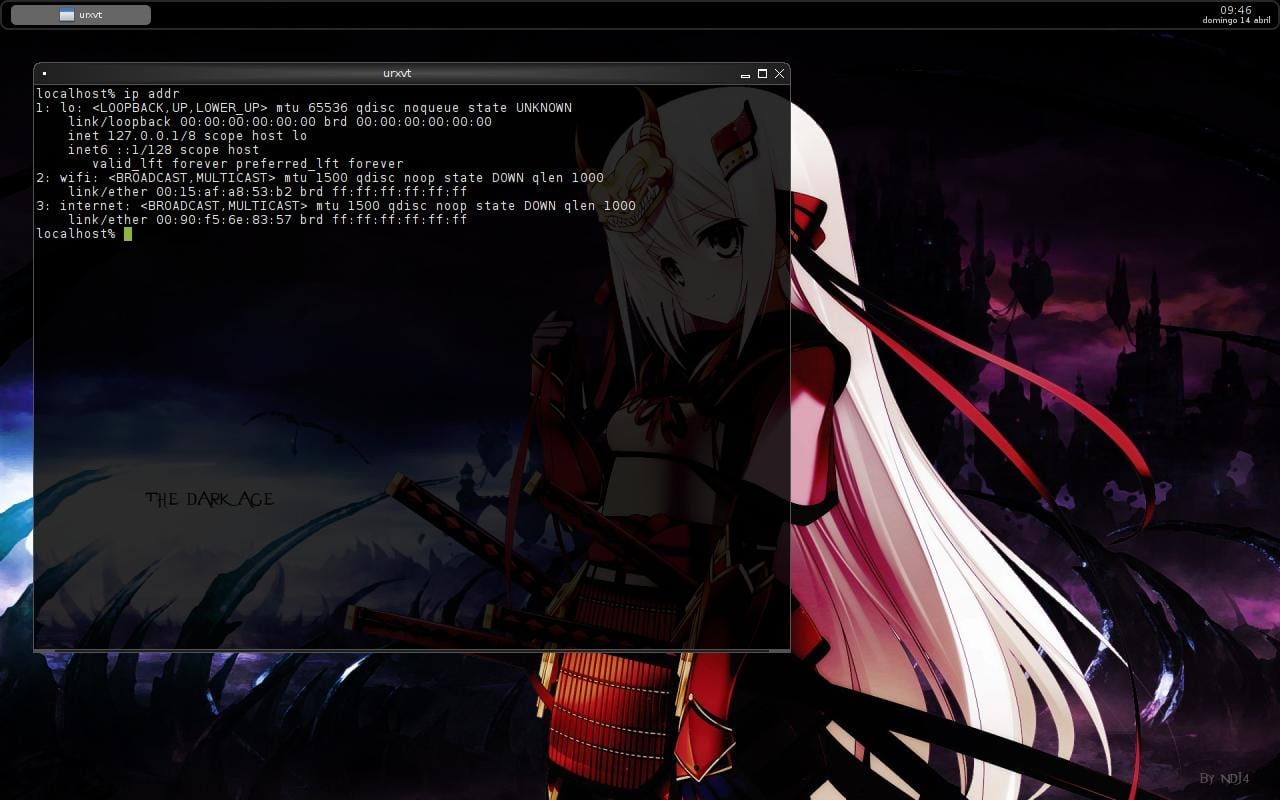
As you will see if we pay attention to the name of the interfaces, the one we have renamed appears with a manageable name that we can easily type.
I hope you find it useful and I invite you to comment and ask questions in the event of any concerns.
From now on I will be posting things like this ... greetings.
woooo thanks for the info, it's great for me, because the names that appear with systemd are a bit of a pain in the ass.
Well yes .. Although it is not a real problem if it is one of form .. Better to do the management of these interfaces with more representative names
LIVE sysvinit XDDD
I imagine but I see that you are not the target user of this post hahaha
I still don't see the good in systemd .. Instead of making our lives easier, it seems to me that it is complicating it .. Can anyone really tell me a "real" advantage?
Another case like pulseaudio that by chance is from the same creator. Such a marvel that it is but it fails more than a fairground shotgun and you have to let Alsa handle the sound again.
To be fair it is still very green but right now the only advantage I can see is that it makes the system start 5 seconds faster for saying something. Hopefully debian still maintains sysvinit and systemd is optional.
In particular, I think that systemd is a good option, only that it will take some time to penetrate the users. One of the things I see is that most of the problems are only done because it is poorly documented ... I do not deny that there could be underlying problems but this does not mean that they are problems that make a certain implementation qualify as bad or good
It seems that the benefits of systemd are somewhat esoteric. I have read explanations about the improvements that I implemented but I do not know if they translate into better performance. And if we didn't have scattering on linux right now there are three startup systems that I know of: sysvinit, upstart, and systemd. And to top it all, systemd is going to force you to change the unix file hierarchy, which is known as / usr move. Some interesting information:
http://hackingthesystem4fun.blogspot.com.es/2012/03/usrmove-la-mentira-usrmove-lie.html
Very interesting article, then I read it in full. (And yes, cleaning up the hierarchy of directories would not hurt, that the configuration files are stored in a directory called "etc" and the application configurations are distributed along different directories distributed by the system It's dumb. In that sense the Fedora people have been doing a good job.)
Regarding what they say about PulseAudio personally, I had never needed it, I am one of those who with ALSA are overflowing (I always recognized HW perfectly).
In the particular case of the distro I use, I never had problems with the desktop machine, although on the laptop it was exasperating how the audio broke after coming out of suspension.
Luckily a few days ago, after commenting on it a lot in the forum, one of the users reported the problem in the bugtracker, they found the error and immediately released a patch that they were responsible for applying to Chakra while waiting for the next stable version of PA that will include that patch.
Current version of PA in Chakra: 3.0
Good tip, +1
Good to see that GNU + Linux has finally emerged from the womb of Unix to become a new, more powerful, flexible and modern system, according to current requirements.
systemd with how huge it is is still incredible, a marvel of power, flexibility and modularity, excellent work by Poettering and associates.
This tutorial is very good, but I think that if you are able to perform all these steps you are also able to learn in p0s4 which is easier, on the other hand it is good to know how things are done, sometimes they are needed and my interface certainly has an incomprehensible name.
Well, I don't really think it's a thing of being able to remember or nope .. what I try to do with this mini tutorial is to solve a potential discomfort for the user in a very superficial way, besides with this I want to show that Gnu linux is extremely flexible so you can customize it at will by following simple steps ... the most superficial point is that it looks more cute by placing personalized things within the system ..
now when installing the new archlinux .iso, the wifi recognizes me as wlp2s0 and sometimes as wlan0, does anyone know why?
Systemd makes the change and the kernel provides support for the interface .. Follow the tutorial that publishes and fix them statically .. this way you save problems
I came across that situation a while ago too, but they are two different things
By convention the file must be less than 80 (usually 70 for this case) and
This depends on how the rest of the configuration is or how many plates we have
cat /etc/udev/rules.d/80-net-name-slot.rules
# This file masks persistent renaming rules for network devices. if you
# delete this file, /usr/lib/udev/rules.d/80-net-name-slot.rules may
# rename network devices according to ID_NET_NAME_ {ONBOARD, SLOT, PATH}
# properties of your network devices, with priority in that order. see
# the output of 'udevadm test-builtin / sys / class / net / $ interface' for
# details on what that new name might be.
#
# http://www.freedesktop.org/wiki/Software/systemd/PredictableNetworkInterfaceNames
In the link, put the 3 options at the end (to freedesktop), with the file it does not create them automatically for me, and it is not a 70- that is, I do not name it with a particular name, it is still eth0 as it should be (yes I have only one) and if I put more like the usb, it follows me named eth1 - 2 - 3, or it names them in the order of detection of the module, 70- it is useful if we have more than one board and we care about the name ( We want a certain board to be eth0 and the other to be eth1 or you want to give it a name, and it does not match the name that automagically comes out of the order of mounting the module)
if it's 80- it keeps magically naming them normal names eth0 eth1 eth2 (according to the order of detection)
if the 80 is not there- or I send it to null I have "strange" names that if I want I can condition them
If it is 70- or in the case of the tutor, 10- I condition the names (there is a bug that went around in January and if it was not 70, I did not take it, I do not remember if it was the arch or the debian, but in a happened)
I find it better to use netcfg and on some computers bridge-utils
in debian I don't use 80- but I use the one that the udev generated before going to systemd /etc/udev/rules.d/70-persistent-net.rules
Most likely the problem comes from debian…. Although it would be necessary to see if the bug affected the raw package available and not the one developed by each distro .. with the latter, as I comment, it is only one of the many ways to make a correct configuration
Look, like any good kacker I asked my / home for space to install Kali Linux (successor to Backtrack 5).
Kali, unlike BT is based on Debian, actually _is_ Debian with the special addition of… systemd!
In fact, it caught my attention - in a positive way - to see that Kali Linux runs with systemd as if it had used Debian all its life.
Meanwhile, the Debian Dev Core group:
"Dev1: -Hey, you heard about that new systemd, wouldn't that be great to implement?"
«Dev2: -WTF, but who do you think you are !!! When you were still shitting yourself I was already using SysV, and I warn you that I plan to continue using it until I die !!! »
«Dev3: -Hey damn, watch what you say ...»
«Dev4: -It seems to me that uncle is an infiltrator ...»
«Dev5: -Look, hake, in Debian we brag about collecting cobwebs, don't give us new shit like this. Perhaps in 15 or 20 years, when it is sufficiently tested, we will give it a second look and if we see that it meets the requirements we will incorporate it into Sid »
«Dev1: -But hey guys, it's fine, don't be like that, it just seems to me that it's a * great * PID1, much more flexible, complete and powerful than SysV, which in fact has been showing signs of ailments for a long time, I just wanted ... »
«Dev2: -BLASFEMIA !!!»
"Dev4: -You, confess, quick, you come from Arch, no damn !?"
«Dev5: -QUEEEEE ??? But what do you think, how are we going to incorporate something that is not sufficiently tested !! ?? "
«Dev1 responding to Dev5: -But hey, it is that nowadays with the wide range of F / LOSS it is no longer necessary to wait for years, since the software is massively tested and by different distributions compatibility and stability is practically guaranteed, just my 50 cents… »
«Dev3: -Well, fuck your 50 cents then, what part did you not understand that this is Debian? We only add outdated software to our distribution, damn it. "
«Dev5: -Of course, well said Dev3, listen to me you Dev1, only when this software begins to be replaced by the next generation of PID1 we will consider incorporating it into Debian. Period, no more talk about the subject. "
«Dev1: -It's that ...»
«Dev2: -And come on, you're looking for it man, you better invest your time in patching and supporting SysV and extending its useful life for another ten years, if it has been serving us so well for 20 years for what are we going to replace it now. »
«Dev3: -That man, if we still look at SysV with affection there is PID1 for a while.»
«Dev1: -Well, ok, I think they are right, I better start to patch a software that was not designed for modern requirements so with a lot of effort we can continue using it ...»
«Dev4: -Sure, of course, that is the way and not your modernisms.
«Dev1: -Ok, ok, they convinced me, systemd is idiotic and the guy who did it is an idiot, who thinks to do such crap when SysV exists?»
Dev {2,3,4,5}: - «Let's toast guys for the next 50 years of stagnation!»
Hopefully elav doesn't know where you live ...
Haha, I imagine him laughing and stroking his baseball bat xD
The advantage of systemd against sysvinit / openrc or upstart, is not that it is so big, it is simply fashionable because it starts in 3 or 4 seconds faster.
I don't know from upstart, I think I never used it, at least knowingly.
The 3 or 4 seconds is relative, I have a computer, which in a full boot took about 10 minutes (a debian without X and with everything possible optimized) with systemd, it went to half or less (same services, same disks, same cpu, same ram), that is, until it takes charge,
If you have ever used ubuntu, you should know that it is upstart, otherwise clearly not.
"It's just in fashion because it starts in 3 or 4 seconds faster."
Actually it is not like that, in fact the main developer of systemd expressly explains in an email from his ML that they never thought of systemd as a quick start system, that this is just a consequence of the working of systemd - which is really juicy thinking on what could be achieved if they decide to optimize systemd to be faster ...
"The advantage of systemd against sysvinit / openrc or upstart, is not that it is so great"
With respect to SysV init the advantage is HUGE compared to Upstart not so much.
SysVinit is a catramina, a cart next to Porsche.
Although SysVinit served its purpose for many years, the reality is that the implicit limitations of a software made, thought and designed many years ago and for that moment are increasingly noticeable.
Some of the problems with SysV in addition to its slow boot time are the race-conditions that generally occur in different environments, its structure for activating and deactivating daemons and how complex it is to add new applications and daemons to this structure without breaking the sequence. Of start.
systemd solves all this in a clean, practical, standardized and well-documented way - when in SysV it is generally that each distribution implements it as it likes.
About Upstart I don't know much beyond its configuration files, which strictly speaking ARE HORRIBLE, it is Chinese, it is torture to edit them and it is very easy to make mistakes if you are not crazy and make a mess.
On the other hand Upstart seems to be really efficient since the latest versions of Ubuntu on my machine started and shut down almost instantaneously - wonderful.
However, when they asked Poettering if sysmted was really needed and if they did not analyze other options such as Upstart, he answered that yes, they had analyzed them, that there were many things they liked and that in fact it was in the plans to implement in systemd but that according to them the structural base of Upstart was not good and that it was very possible that in the future they would have problems derived from it.
Remember that systemd was born as a Red Hat initiative for two important reasons:
1. Due to the _vastisima_ experience that the company has in its thousands of deployments, they came to the conclusion that they need to make certain fundamental changes in their system to meet their requirements, changes that logically unnerve more than one veteran - like all profound changes .
2. It is no secret to anyone that Red Hat seeks to be Red Hat and not GNU + Linux.
Beyond arabesques and other distractions, the fact is that systemd is being increasingly adopted by the GNU + Linux community and this is necessarily good for several reasons:
1. development is accelerated so a better product can be achieved in less time
2. By including the needs of various distributions and by collaborating with major developers of those distributions with systemd and interacting with developers from other distributions discussing patches and features, it is infinitely easier to achieve a quality product
3. It is agnostic to the distribution in which it is implemented (very important!) And consolidated as a standard (as is POSIX) something that an administrator who has to work in heterogeneous environments composed of different distributions but who share a management base will surely value similar system.
$ systemctl will work the same on Fedora as openSUSE or Arch or Chakra or Red Hat or Kali Linux or any other distribution that uses systemd and that's great.
4. Having a large number of suitable people working on the same PID1 used by the distro itself makes the work much easier for the devs themselves when solving problems or seeking help or ideas on how to implement one or another function.
5. As systemd is an open and -very important- interdisciplinary project, the rate of adoption and improvement of the project is one of the highest of the FLOSS projects.
For example, when a maintainer of a package of any distribution, which involves starting daemons at the beginning, presents his version of the service in the systemd mailing list asking for comments and suggestions, it is happening that after a general collaboration it is possible to have that service to point, in the best possible way, the one that not only uses the developer who opened the topic but also sends UPSTREAM to the developers of the application itself so that they can decide if they want to make that service part of their own package and with that make it 100 % systemd-compatible OOTB.
6. systemd has hundreds of hundreds of new features that make the administration of the systems it manages much easier and smoother. For example, it is responsible for managing the PAM module for login managers, managing remote connections to the system, loading on-demand services listening on sockets instead of having a daemon sleeping in memory and stealing CPU and memory waiting to be activated, manage in a reliable way network interfaces and devices plugged into the system ... it is really a monster, a huge Leviathan but unlike other systems of this size it works agile, fast and very smooth and I think the only reason that this is so , for a HUGE system such as systemd (think that in a short time it will manage the entire system) is that it is designed to be efficient, modular and scalable from the ground up.
Particularly what I suffer the most from using systemd is that I have to re-learn everything that until now I have been using to manage my machine.
It is understandable that some prehistorics used to using a certain methodology for many years resist such a change ... but hey! This is computer science, here the only thing that does not change is that the change is continuous 😉
Greetings.
I forgot:
"If you've ever used ubuntu, you should know what upstart is, if not clearly not .."
What an unpleasant response, right? Own of someone who believes it and knows very little.
Following your reasoning, I'm absolutely sure that you know how all the food you eat is produced, right? I say EVERYTHING.
The same as when you get on the bus or on a plane, you have absolute knowledge of all the parts of the vehicle, even the smallest, of how it works, what oils, lubricants and other fluids they use and how each one is composed and its manufacturing process .
Or when you use a pen, surely you have very clear how the ink is made.
I do not know if @ was passing by here I still do not read your stupidity or is simply too polite and civilized to answer you as you should.
For my part, I'm already old and grumpy enough to put up with giles like you:
SUCK ME AN EGG.
(and no, I don't defend anyone, I just fell too ill with such mediocrity and poisonous arrogance in a single sentence).
msx, windows uses the same boot system from the time of Moses xD, the same file system, the same sound system and nothing happens! So this is Linux, where we reinvent the wheel or try it every 5 or 6 years, but it's not computing, it's just a part of it XD
Ahh look ...
Clearly not.
The boot system changed from 98 / Me to XP (NTLD) and then changed again with Windows 7 and now it was updated with Windows 8 - which is logical because the technologies are not the same and the requirements are not the same.
windows 7 has the windows vista.
msx, but what the hell do you smoke, but what the hell have you believed? Yes I have answered totally normal, but you have shit in your head interpreting things as a person with an inferiority complex, it is not my fault. It was simply a statement that I made to the partner, without wanting to cheat or anything, you created everything in your head, damn wey, go and have a linden, for that bitterness that you have inside
I already asked you the other day to please stop with this. I am not the father of either of them to be scolding them .. They are going to fight for Twitter, G + or Skype .. It's good now.
Very good,
what maybe debian has (for now), is that it is not so strict with scripts and magically accommodates, although the "Yes, do what I say!" priceless
That Arch are blasphemers? Well, Arch is the complete opposite of Debian Stable, it sure is that
No no, it's how those digital cavemen see us, totally scared of the rhythm that archers carry ;-D
The main problem is not the commands, but the habit that grabs a distro with which it gets used.
Arch's good option, but for now I'll try Slackware.
Thanks for the tip!
how good that was useful
Good tip =) only that in the writing of the text it comes as follows
"A simple text file named 10-network-rules." and in the image that is the correct way it comes as 10-network.rules
regards
It served me ... because of a conky configuration that I have but I am also against this type of article where they make linux seem very difficult to inexperienced eyes ..
What difference does it make if your interface is called what it is called if the important thing is that you have internet .. the same and in my conky configuration the other name of the wifi would serve me and if it is for using aircrack it is also the same story but as linux gives you that customization option then change it .. thanks for the article .. an image
https://pbs.twimg.com/media/BI9FCzQCEAIM0ud.png:large