Jau DesdeLinux mēs parādīsim, kā instalēt brīze (jauno artwork un KDE stils 5) ArchLinux un tamlīdzīgos, tomēr dažos izplatījumos, piemēram, Kubuntu vai Fedora, krātuvēs nav nepieciešamo pakotņu. Ko es darīšu ar šo ierakstu, parādīšu, kā instalēt Breeze Kubuntu, nemirstot mēģinājumā.
Kā instalēt Breeze uz Kubuntu?
Pirmkārt, mēs pārliecināmies, ka mums ir instalēta pakotne xz-utils lai varētu atspiest failus, kurus mēs lejupielādēsim. Tagad mēs turpināsim, atverot termināli un ievietojot:
mkdir ~ / Breeze CD ~ / Breeze /
Tagad, kad atrodamies mapē, pakotnes lejupielādējam no ArchLinux krātuvēm:
Par 32Bits
wget -c http://mirror.gnomus.de/extra/os/i686/breeze-5.1.1-1-i686.pkg.tar.xz && wget -c http://mirror.gnomus.de/extra/ os / i686 / breeze-kde4-5.1.1-1-i686.pkg.tar.xz
Par 64Bits
wget -c http://mirror.gnomus.de/extra/os/x86_64/breeze-5.1.1-1-x86_64.pkg.tar.xz &&
wget -c http://mirror.gnomus.de/extra/os/x86_64/breeze-kde4-5.1.1-1-x86_64.pkg.tar.xz
Tagad mēs tos izslēdzam:
tar -Jxf breeze-5.1.1-1-x86_64.pkg.tar.xz
tar -Jxf breeze-kde4-5.1.1-1-x86_64.pkg.tar.xz
Rezultātā mums Breeze iekšpusē būs mape ar nosaukumu usr. Tagad turpinām kopēt nepieciešamos failus:
cd usr / lib / sudo cp -Rv kconf_update_bin / / usr / lib / sudo cp -Rv kde4 / / usr / lib / sudo cp -Rv qt / * / usr / lib / qt4 / sudo cp -Rv qt4 / / usr / lib / cd ../share/ sudo cp -Rv apps / usr / share / sudo cp -Rv krāsu shēmas / usr / share / sudo cp -Rv ikonas / usr / share / sudo cp -Rv kconf_update / usr / share / sudo cp -Rv kservices5 / usr / share / sudo cp -Rv kstyle / usr / share / sudo cp -Rv kwin / usr / share / sudo cp -Rv lokalizācija / usr / share / sudo cp -Rv QtCurve / usr / share / sudo cp -Rv tapetes / usr / share /
Tādā veidā mūsu sistēmā jau būs pieejams stils. Mēs gatavojamies Preferences »Lietojumprogrammu izskats» Stils un mēs izvēlamies Breeze.
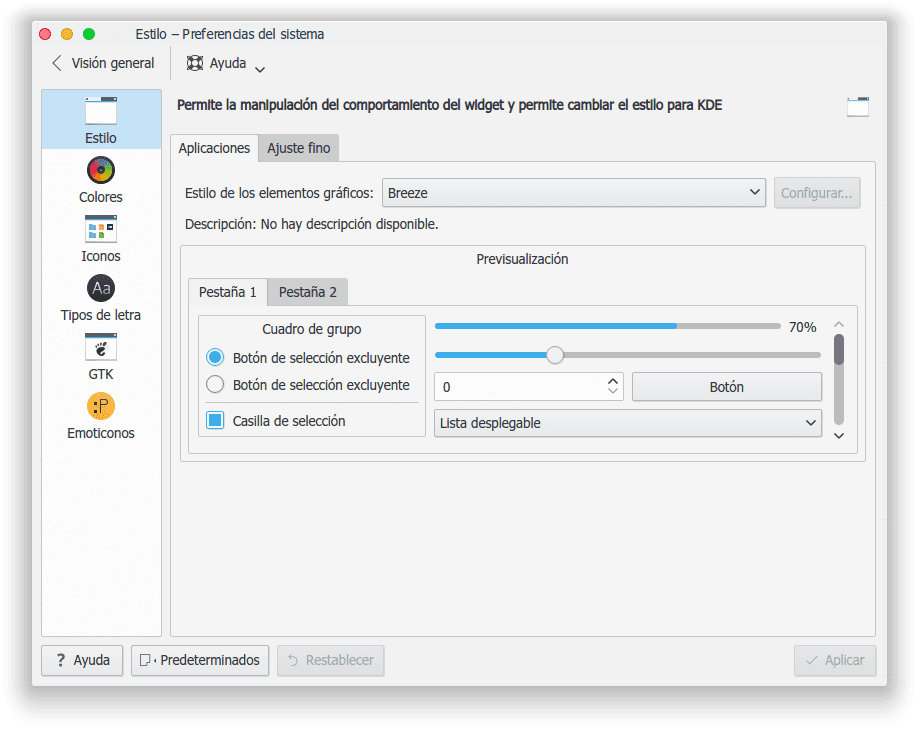
Un tas ir viss dārgie draugi. Tādā veidā mēs varam instalēt Breeze tajos izplatījumos, kuru krātuvēs nav nepieciešamās pakotnes.
Kā atinstalēt Breeze Kubuntu?
Labi, jūs mani iemācījāt instalēt Breeze, un tagad es vēlos to atinstalēt
Mēs izveidojam teksta failu ar nosaukumu DeleteBreeze.sh un ievietojam to iekšā:
#!/bin/bash
rm -Rfv /usr/lib/kconf_update_bin/kde4breeze
rm -Rfv /usr/lib/kde4/plugins/styles/breeze.so
rm -Rfv /usr/lib/kde4/kstyle_breeze_config.so
rm -Rfv /usr/lib/qt4/plugins/styles/breeze.so
rm -Rfv /usr/lib/qt/plugins/kstyle_breeze_config.so
rm -Rfv /usr/lib/qt/plugins/styles/breeze.so
rm -Rfv /usr/lib/qt/qml/QtQuick/Controls/Styles/Breeze
rm -Rfv /usr/share/kconf_update/kde4breeze.upd
rm -Rfv /usr/share/icons/breeze
rm -Rfv /usr/share/icons/breeze-dark
rm -Rfv /usr/share/icons/breeze_cursors
rm -Rfv /usr/share/color-schemes/Breeze.colors
rm -Rfv /usr/share/color-schemes/BreezeDark.colors
rm -Rfv /usr/share/kservices5/kwin/kwin4_decoration_qml_breeze.desktop
rm -Rfv /usr/share/locale/nds/LC_MESSAGES/breeze_style_config.mo
rm -Rfv /usr/share/locale/uk/LC_MESSAGES/breeze_style_config.mo
rm -Rfv /usr/share/locale/sr@ijekavian/LC_MESSAGES/breeze_style_config.mo
rm -Rfv /usr/share/locale/pt/LC_MESSAGES/breeze_style_config.mo
rm -Rfv /usr/share/locale/sr@latin/LC_MESSAGES/breeze_style_config.mo
rm -Rfv /usr/share/locale/pl/LC_MESSAGES/breeze_style_config.mo
rm -Rfv /usr/share/locale/ko/LC_MESSAGES/breeze_style_config.mo
rm -Rfv /usr/share/locale/pt_BR/LC_MESSAGES/breeze_style_config.mo
rm -Rfv /usr/share/locale/ja/LC_MESSAGES/breeze_style_config.mo
rm -Rfv /usr/share/locale/zh_CN/LC_MESSAGES/breeze_style_config.mo
rm -Rfv /usr/share/locale/sr@ijekavianlatin/LC_MESSAGES/breeze_style_config.mo
rm -Rfv /usr/share/locale/sv/LC_MESSAGES/breeze_style_config.mo
rm -Rfv /usr/share/locale/de/LC_MESSAGES/breeze_style_config.mo
rm -Rfv /usr/share/locale/ru/LC_MESSAGES/breeze_style_config.mo
rm -Rfv /usr/share/locale/fi/LC_MESSAGES/breeze_style_config.mo
rm -Rfv /usr/share/locale/zh_TW/LC_MESSAGES/breeze_style_config.mo
rm -Rfv /usr/share/locale/el/LC_MESSAGES/breeze_style_config.mo
rm -Rfv /usr/share/locale/cs/LC_MESSAGES/breeze_style_config.mo
rm -Rfv /usr/share/locale/es/LC_MESSAGES/breeze_style_config.mo
rm -Rfv /usr/share/locale/ca/LC_MESSAGES/breeze_style_config.mo
rm -Rfv /usr/share/locale/hu/LC_MESSAGES/breeze_style_config.mo
rm -Rfv /usr/share/locale/nl/LC_MESSAGES/breeze_style_config.mo
rm -Rfv /usr/share/locale/da/LC_MESSAGES/breeze_style_config.mo
rm -Rfv /usr/share/locale/sl/LC_MESSAGES/breeze_style_config.mo
rm -Rfv /usr/share/locale/sr/LC_MESSAGES/breeze_style_config.mo
rm -Rfv /usr/share/locale/nb/LC_MESSAGES/breeze_style_config.mo
rm -Rfv /usr/share/locale/en_GB/LC_MESSAGES/breeze_style_config.mo
rm -Rfv /usr/share/locale/sk/LC_MESSAGES/breeze_style_config.mo
rm -Rfv /usr/share/QtCurve/Breeze.qtcurve
rm -Rfv /usr/share/kwin/decorations/kwin4_decoration_qml_breeze/contents/ui/BreezeButton.qml
rm -Rfv /usr/share/kwin/decorations/kwin4_decoration_qml_breeze/contents/ui/ShadowEdge.qml
rm -Rfv /usr/share/kwin/decorations/kwin4_decoration_qml_breeze/contents/ui/ShadowGradient.qml
rm -Rfv /usr/share/kwin/decorations/kwin4_decoration_qml_breeze/contents/ui/BreezeApplicationMenuButton.qml
rm -Rfv /usr/share/kwin/decorations/kwin4_decoration_qml_breeze/contents/ui/ShadowCorner.qml
rm -Rfv /usr/share/kwin/decorations/kwin4_decoration_qml_breeze/contents/ui/BreezeMinimizeButton.qml
rm -Rfv /usr/share/kwin/decorations/kwin4_decoration_qml_breeze/contents/ui/BreezeCloseButton.qml
rm -Rfv /usr/share/kwin/decorations/kwin4_decoration_qml_breeze/contents/ui/BreezeMaximizeButton.qml
rm -Rfv /usr/share/kwin/decorations/kwin4_decoration_qml_breeze/contents/ui/BreezeHelpButton.qml
rm -Rfv /usr/share/kwin/decorations/kwin4_decoration_qml_breeze/contents/ui/BreezeKeepBelowButton.qml
rm -Rfv /usr/share/kwin/decorations/kwin4_decoration_qml_breeze/contents/ui/BreezeKeepAboveButton.qml
rm -Rfv /usr/share/kwin/decorations/kwin4_decoration_qml_breeze/contents/ui/config.ui
rm -Rfv /usr/share/kwin/decorations/kwin4_decoration_qml_breeze/contents/ui/BreezeStickyButton.qml
rm -Rfv /usr/share/kwin/decorations/kwin4_decoration_qml_breeze/contents/ui/main.qml
rm -Rfv /usr/share/kwin/decorations/kwin4_decoration_qml_breeze/contents/ui/BreezeShadeButton.qml
rm -Rfv /usr/share/kwin/decorations/kwin4_decoration_qml_breeze/contents/ui/ShadowFrame.qml
rm -Rfv /usr/share/kwin/decorations/kwin4_decoration_qml_breeze/contents/ui
rm -Rfv /usr/share/kwin/decorations/kwin4_decoration_qml_breeze/contents/config/main.xml
rm -Rfv /usr/share/kwin/decorations/kwin4_decoration_qml_breeze/contents/config
rm -Rfv /usr/share/kwin/decorations/kwin4_decoration_qml_breeze/contents
rm -Rfv /usr/share/kwin/decorations/kwin4_decoration_qml_breeze/metadata.desktop
rm -Rfv /usr/share/kwin/decorations/kwin4_decoration_qml_breeze
rm -Rfv /usr/share/apps/color-schemes/Breeze.colors
rm -Rfv /usr/share/apps/color-schemes/BreezeDark.colors
rm -Rfv /usr/share/apps/QtCurve/Breeze.qtcurve
rm -Rfv /usr/share/apps/kstyle/themes/breeze.themerc
rm -Rfv /usr/share/wallpapers/Next/
rm -Rfv /usr/share/kstyle/themes/breeze.themerc
exit 0
Mēs to saglabājam un piešķiram atļaujas:
chmod a + x ClearBreeze.sh
Un tad mēs to izpildām:
sudo ./DeleteBreeze.sh
Un tas arī viss.
Man vienmēr ir bijis jautājums ar kde, jo tā noklusējuma stili ir bināri, nevis rediģējami faili, kā tas ir Linux sistēmā?
Pieņemsim, ka es vēlos mainīt kādu Breeze detaļu, es uzskatu, ka tēma pastāv kā .so bibliotēka, nevis kā QSS stilu lapas, kas loģiski būtu runāt par QT un QML.
Atliek iegūt avota kodu, taču es joprojām nesaprotu, kāpēc vizuālais stils jāapkopo bināros failos.
Es godīgi nezinu, lai gan es domāju, ka tas jādara, lai viņi darbotos ātrāk. Skābeklis ir daudz ātrāks nekā QtCurve vai QtCurve motīvi.
KDE konfigurācijas faili ir parastie teksta faili, kas glabājas (vismaz Kubuntu) mapē ~ / .kde / share / config
Es atsaucos uz pašas vizuālās tēmas failiem, nevis uz iestatījumiem.
Piemēram, kur jūs maināt "Oxygen" vai "Breeze" vizuālo materiālu "rezervi" vai "polsterējumu"? Gtk tēmas ir teksta faili, kurus varat atvērt, pārskatīt vai modificēt, QT ir jāizmanto QSS stila lapas, kuras varētu arī izlasīt un modificēt, bet KDE noklusējuma motīvus atstāj pilnīgi slēgtus.
Kā jau teicu iepriekš, pārbaudot savu sistēmu, redzēsiet, ka Breeze ir .so bibliotēka, tāpat kā skābeklis.
būt kubuntu nevar būt no kāda ppa?
Instalācija Fedorā:
#dnf copr iespējojiet dvratil / plasma-5
#dnf instalējiet plasma-breeze-kde4
Tad jūs varat saglabāt repo vai atinstalēt to ar:
#dnf copr atspējojiet dvratil / plasma-5
Paldies par padomu
Sveiki, lieliska ziņa, man ir tikai viens vaicājums, man patīk jūsu loga stils, pogas aizvēršanai, samazināšanai utt., Apaļas un izlīdzinātas beigās, kā man tas pats? Paldies par jūsu ierakstu, es vienmēr sekoju viņiem līdzi. Priekā
Vai krāsainiem punktiem, lai samazinātu, palielinātu un aizvērtu, vajadzētu iznākt?
Viss pārējais mainījās, izņemot to, ka kaut kas būs nepareizi izdarīts u_ú
Nē nē, tā ir tēma, kuru jūs atmetat no KDE-Look 😀
Kurš? u_ú
Tas ir YosiWhite, vai ne?
Es domāju, ka tas vairs nav noderīgi, tas uzmet 404 visiem failiem, kuri ir jālejupielādē gan 32, gan 64 biti, vai es esmu vienīgais, kas notiek?
Es to uzstādīju ar šiem spoguļiem, kurus atradu googlē, līdz šim es neesmu pamanījis nevienu problēmu salīdzinājumā ar šeit esošajiem
Operētājsistēmai x64:
wget -c http://mirror.bjtu.edu.cn/chakra/kde-next/x86_64/breeze-5.1.1-1-x86_64.pkg.tar.xz &&
wget -c http://mirror.bjtu.edu.cn/chakra/kde-next/x86_64/breeze-kde4-5.1.1-1-x86_64.pkg.tar.xz