

GIMP 2.8 Was it worth the wait?
GIMP is, without a doubt, one of the flagship programs of the world GNU / Linux and conforms together with Inkscape y Scribus the triad that is a solution for those of us who are professionally dedicated to graphic design. Basically to the branch of graphic arts. Particularly GIMP has been used to argue that the only thing preventing graphic design professionals from migrating to GNU / Linux it is ignorance, comfort and even laziness for not wanting to learn something new. Some of the many real reasons for such an impediment, I explained as best I could on the subject GIMP ... where yes and where sometimes.
GIMP 2.8 generated a huge expectation, not so much because of the background changes but, rather, because of what was supposed to be a re-engineering in terms of managing the work areas, pallets and tools ... and frankly they did. very bad.
One of the great mistakes of the team GIMP was trying to emulate the way Photoshop handles their toolboxes, but while the product of Adobe has behind its functional design a team that knows a lot about building and implementing productive interfaces, those of GIMP They have ignored once, and again, and again what we really need as design and graphic arts professionals to turn it into a reliable, easy-to-use tool that you don't have to wait for, well, it is available in the repositories of the distro you use to install it without any problem.
In advance I apologize for the images that I will use to illustrate my examples, but it has been easier for me to install GIMP en Windows 7 that Linux Mint Maya.
Photoshop's mono-window
The single window mode problem in GIMP 2.8 is that it forces the tool box to the left and the pallets to the right.
The concept of presenting collapsed and recessed toolboxes and pallets is not a bad idea, in fact to Adobe it has worked perfectly well for him. It's even basically the same concept that operating systems have been taking as the desktop paradigm -Unity y Windows 8, e.g.- and part of the intelligence that through one or more Docks We can have files and / or functionalities in an easy, intuitive way and represents a space saving.
If that was the idea of the people who develop GIMP Where then is the problem?
Let's first see how those Docks en Adobe Photoshop to understand the principles of its functionality:
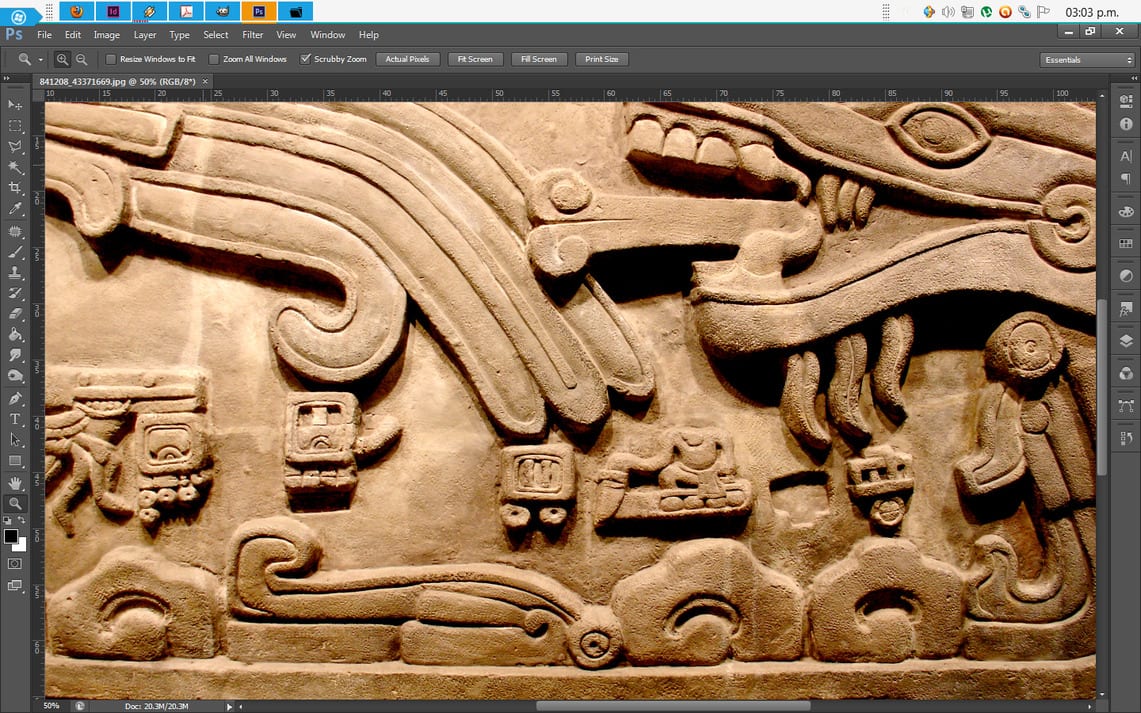
1.-On the left we see the toolbox and on the right a series of twelve docked palettes, in both cases they are integrated into a single window. At the top, below the menus, we have a bar that displays the properties and functionalities of the work tools.

2.-These properties and functionalities are changing, in the upper bar, according to the tool chosen.
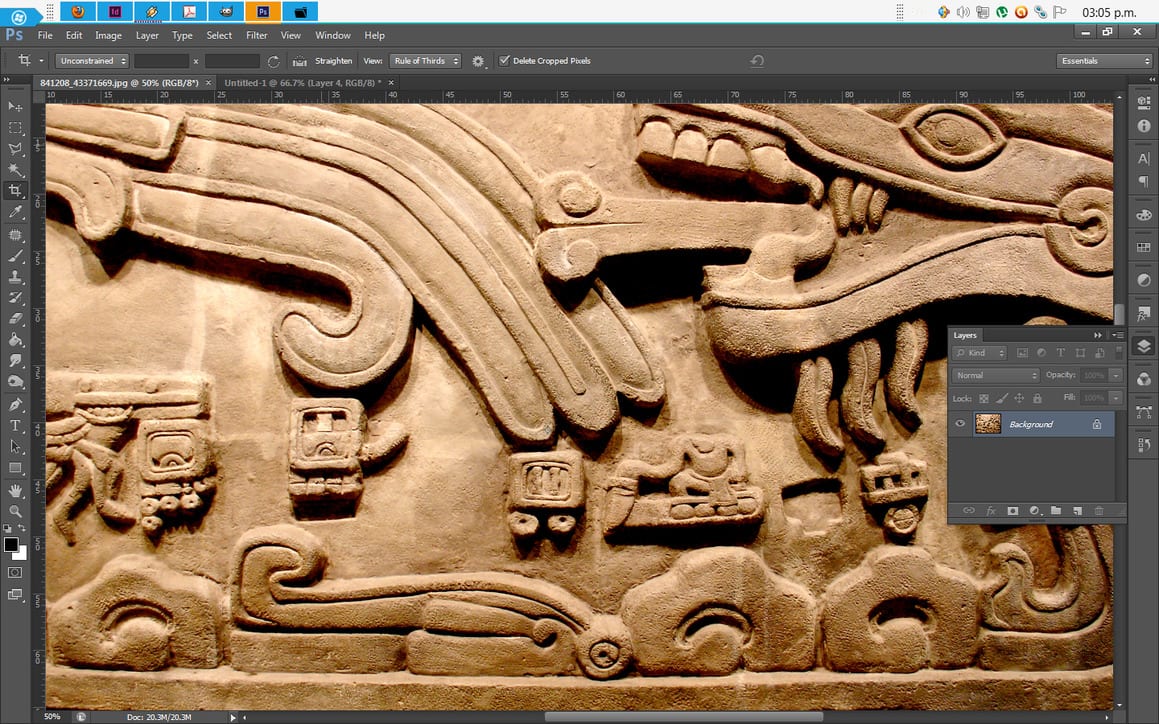
3.-The bar on the left compacts, vertically, the pallets that we are using, a «Click» On the icon that represents each palette, it displays it to be able to use it. In unfolded mode, each pallet can be scaled to the size that suits us without affecting the dimensions of the "Dock" nor to the other pallets.
The GIMP 2.8 mono-window
Now why, from my point of view, the mono-window of GIMP has serious deficiencies? I will try to explain myself as best I can.
The point was not to make a workspace in a single window, but to make a single window that offers advantages in terms of optimization of the workspace and that when working in that mode -mono-window- the availability of tools and work pallets was fast and intuitive.
Let's see and analyze how the workspace looks like in single window mode in GIMP 2.8
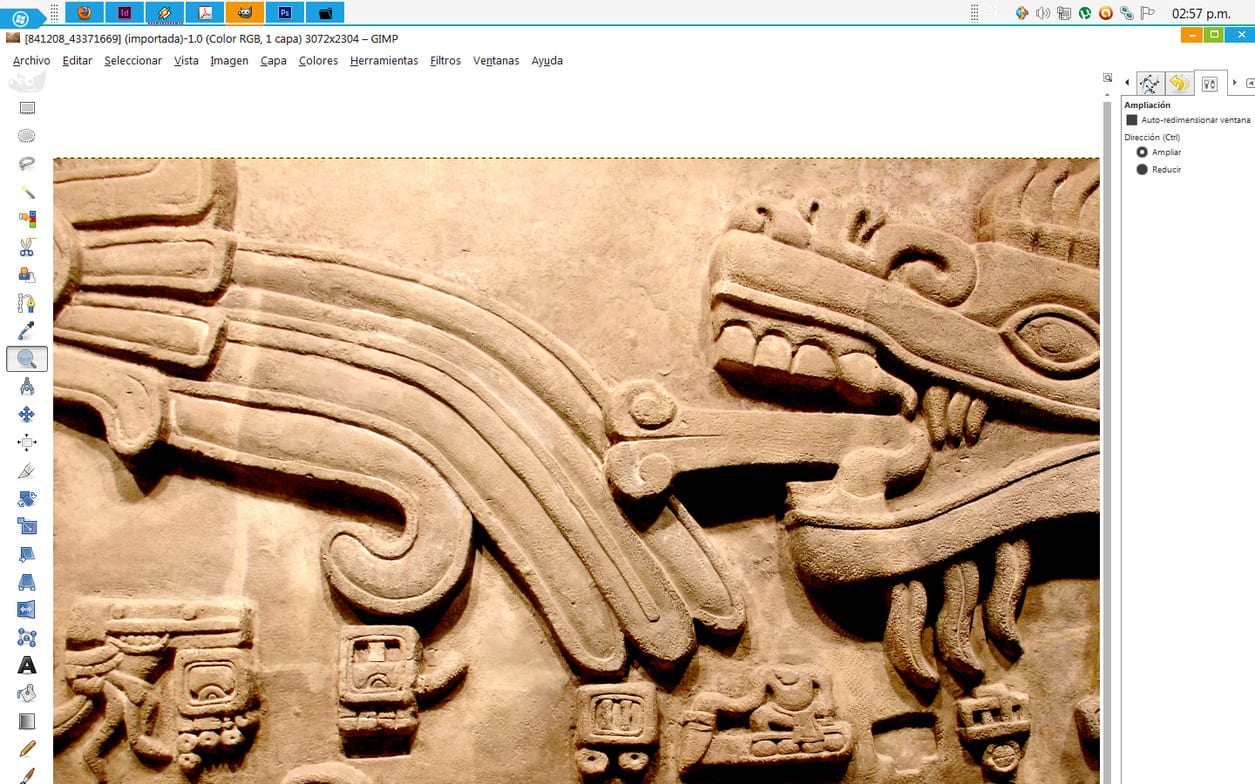
The first design problem is that the bar containing the work tools -on the right- It is complicated to use if we have one column per tool. A part of the tools is hidden without the possibility of accessing them, unless it is arranged in two columns:
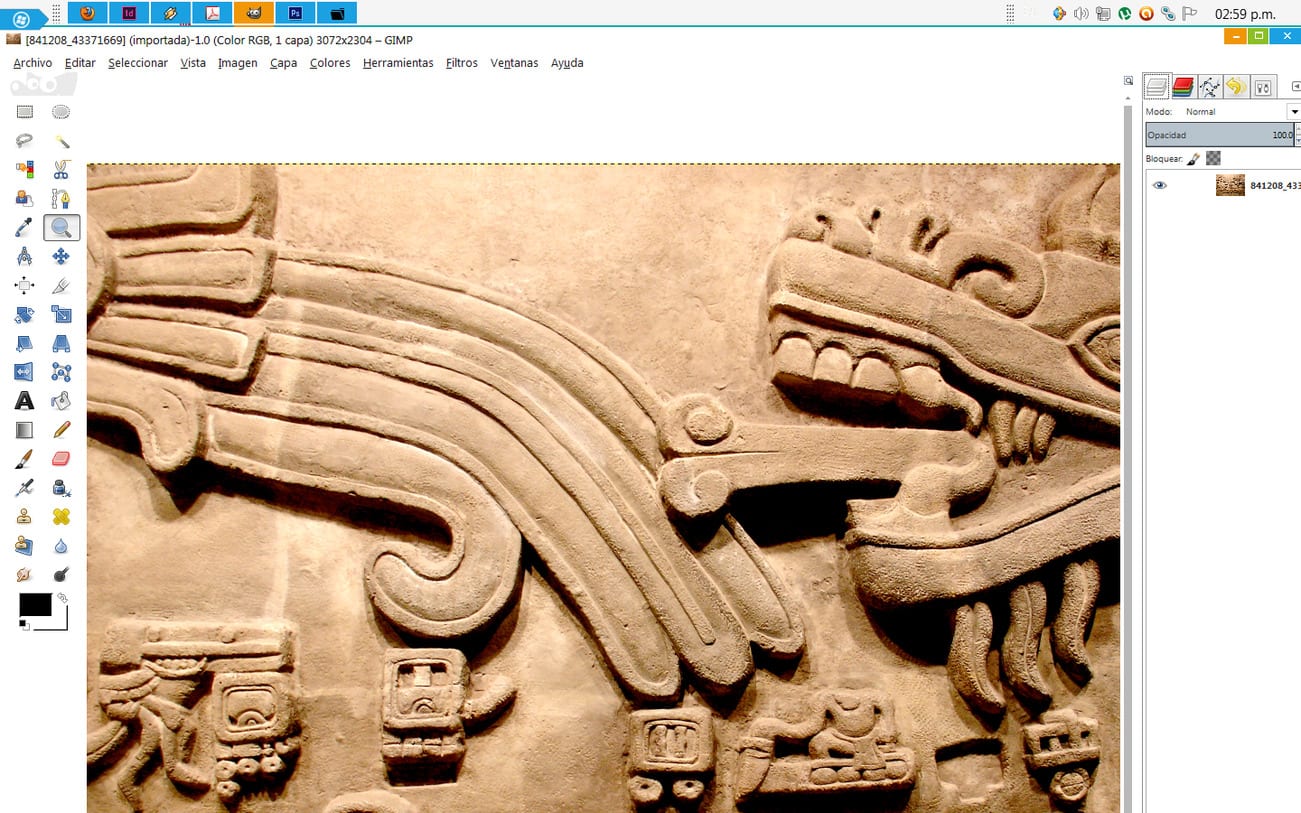
Despite GIMP 2.8 has fewer tools than Photoshop It is not possible to use them properly in mono-window mode if we have the toolbar one line. And the problem is not the size of the icons but of optimization in the distribution.
Let's compare again:
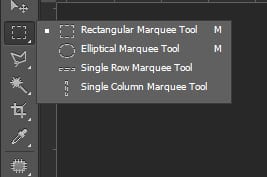
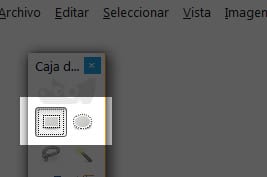
While Photoshop group your tools by categories, GIMP 2.8 no. This means that in GIMP 2.8 each tool icon occupies a space and, even if they are less, they seem to be more. The illustration exemplifies as in Photoshop with «Click» We can display the option to have up to four different modes of the same tool in a single icon or button, while in GIMP it takes up twice the space to show only two modes of the same tool.
Something similar happens with the palettes in the mono-window mode with GIMPWhile Photoshop create a vertical bar GIMP stacks, does not collapse, the pallets and arranges them in a series of horizontal tabs to allow the availability of each pallet. This horizontal arrangement of the pallets does not represent any benefit of space, since in addition to occupying that horizontal space it also occupies the entire vertical. While it is true that the stack of pallets can be hidden manually this is not practical, because then we have to be moving the size of the stacked pallets to see the tabs and have them available.
But also in GIMP 2.8 either the single-window mode or the floating panels are used ... there is no way to choose between embedding a panel to the stack anchored to the right and leaving others floating at the same time.
My conclusion
While it is true that the single window mode in GIMP 2.8 represents a certain advantage when working with several images at the same time, that same advantage is lost by the very unproductive way of stacking the pallets and work tools. From my point of view they should be two different functionalities; one that groups all the different work areas into tabs and another that allows you to choose between using floating panels for tools and pallets or mounting them in a single window, as you do. Photoshop.
I also believe that the development team of GIMP missed a great opportunity to work on other pain points that would be much more useful than single window mode, such as a more efficient way to handle layer masks for color adjustments or a visualization CMYK native. Instead, they opened up another front of deficiencies for improvement which means that the effort of the small team of developers will be dispersed as they have more problems to solve.
One of two readers will surely exclaim »Free criticism of the work of a very small group of devs is totally pointless.". And you are right… if my criticism were baseless. But also, don't we who dedicate ourselves to design and graphic arts have the right, and the knowledge that experience gives, to express our opinion with the aim of improving a product that, it is supposed, aspires to be a useful tool for us?
Hopefully sometime ... just for one damn time, the development team at GIMP ask us what we really need instead of assuming. Or at least read our suggestions which, believe it, have been many.
As always, Tina, your articles fascinate me because they are well done and argued. I'm glad to read you again. As I have said before, I am not a professional in the areas related to design, but sometimes I use GIMP to get around some needs.
How I wish I could better use this great tool. I hope to be able to adapt to the changes, even though it will entail certain difficulties because of what you explain in your article.
Thank you very much and I hope you continue to collaborate more often on Desde Linux.
See you soon!
It would not be a bad idea to learn how to use GIMP 2.8 properly before making according to which categorical statements,
But, in addition, in GIMP 2.8 either the single-window mode or the floating panels are used ... there is no way to choose between embedding a panel in the stack anchored to the right and leaving others floating at the same time.
Example
Joe, you are absolutely right in the world. Thank you so much for correcting that mistake of mine. What you can't do is unpin the toolbar on the left.
However my mistake -which I admit is a big mistake- does not detract in the least from my statement:
The panels are removable or not, the truth is that the way in which GIMP 2.8 Stacking them when you anchor them is a bad solution ... if what you are looking for is productivity and I will exemplify it:


Imagen 1
Imagen 2
Imagen 3
Note: To display the image in natural size, please click on each small image.
Pictures 1 and 2 show the work area with five stacked and recessed panels on the left. In image 1 I have stacked them in a single group of five, while in image 2 I show them stacked in three groups: one of two -arriba-, one of one -in the middle- and another of two -down-
Image 3 shows the same five panels, but as a floating palette.
If we compare the three workspaces, we can see that the one in the third example is much more productive for the simple reason that the pallets do not take up as much space.
It doesn't matter so much whether the paddles are anchored or not. The central point is that the GIMP presents this single window mode as a breakthrough when in reality it is an incomplete and flawed task -not to say badly done- and that, in addition, they were able to use that effort to make really important improvements such as the correct handling of images RAW, For example.
Dear Tina Toledo.
I found the content and writing of your article excellent. I have also taken the opportunity to read the other article that you mention and I also found it very good.
I think I have understood your arguments very well, although unfortunately, maybe not the substance of them. Is the objective of your article to make a contribution to improve GIMP? Is this contribution, mainly, proposing that the document window have flaps even though the tools are separated from it? It seems like an interesting option. Suggest a “dock” style for tool palettes? I think it could be useful.
On the other hand, I must tell you that your article (also the one about "where yes and where sometimes") leaves me sad. It is that background that I do not understand very well that I do not like and that makes me sad. Playing psychologist-cat, if you allow me, it seems to me that you are trying to justify yourself, that you consider that free software is better (for whatever reason) but that you, that you are a great professional (and it seems that proving it was another of the purposes of your articles) you cannot use it due to the great obstacles that you encounter.
Yes, I understand your anger with the GIMP team, they have not called me this time to ask me what things I would like them to put in this new version. Also, if they never consult with those who really know, how are they going to improve it?
I would very much like to find among the conclusions of your articles something like that, in short, such a program is technically much worse than another, but that you use it because it is free and the moral is for you, as a mother in more than 90% of occupation, much more important than "indexed colors for direct inks" and because you know, as a jazz lover, that "a good Charlie Parker" is capable of giving an excellent concert even with a plastic sax.
As the father of hundreds of cats, I would rather leave a freer world (and what that implies) as an inheritance than a more technically advanced one. Sacrifice development, decrease, rather than being a slave to four large companies. In addition, I think that doing so, in the long run, will allow more (and above all, better) technological development.
Thank you very much for collaborating with free software.
A sad cat, not blue.
Speed Cat:
You are not wrong about anything when, in that exercise of yours, you try to make him a psychologist. Indeed the article GIMP ... where yes and where sometimes is a justification on my part:
justification.
(From the lat. Iustificatĭo, -ōnis).
1. f. Action and effect of justifying.
2. f. Cause, motive or justifying reason.
3. f. Compliance with what is fair.
4. f. Evidence that is made of the innocence or goodness of a person, an act or a thing.
5. f. Compelling proof of something.
But not a pretext:
pretext.
(From the lat. Praetextus).
1. m. Reason or simulated or apparent cause that is alleged to do something or to excuse itself for not having done it.
However, you are wrong to think that my articles are written to try to show that "I am the great professional" And you are nobody, absolutely nobody, to judge my intentions. You are not my friend, you do not know me personally, we have never had a personal relationship and I have never given you the freedom to take the confidence to judge me as a person.
If the arguments I have used to "justify" my position about GIMP As a tool they seem debatable, refute them! That is your right since what is on the table of the discussion are my arguments ... not my person.
I'll give you another news, never EVER! You are going to read an article of mine in which I affirm that I use this or that design program, as a work tool, because it is "Morally correct"What if you will read is that I use it because it serves me well. Point.
And I also clarify that I am not going to allow you to put my morality on trial for the reasons that I explained before: you are not my friend, nor do I consider you my friend, you have never asked my permission to exercise such trust and neither did I I have given it. I repeat it in case it was not clear to you the first time.
I do not agree that a good Charlie Parker be able to give an excellent concert with a plastic saxophone. He will be very talented but that talent will be limited to the capabilities of the saxophone -be it plastic or any other metal-, you will probably get better grades than other jazz players with less talent and I'm sure that plastic sax will not be used for their serious concerts.
Dear Tina Toledo.
It has become quite clear to me that we are not friends, that you do not consider me such and that you do not authorize me to be. Too bad, because I do want to be friends with everyone; when they leave me, of course.
Although I have a habit of judging what seems appropriate to me without waiting for anyone to give me permission to do so, it turns out that in this trial of trials you have been wrong, I did not judge your morals but appealed to it. I did it to introduce a factor in your considerations about free software: ethics, which for me is important in any order of life and especially in the free / proprietary software dilemma. It is clear from your paragraph in which you say that you use a program because it serves you (period) that it is not a determining factor for you. By the way, with this you put it on the table and offer to judge it to those of us who read to you.
Unless you have first-hand information about the development of GIMP, which I do not know, I also see a contradiction in what you tell me about judging intentions. Or is it not judging the intentions of the GIMP team to say that they try to emulate the operation of boxes of tools from that other program you are talking about?
Dear Tina Toledo, please, do not consider my opinion an attack on your person but, in any case, on your speech. As you have clearly highlighted in your answer, I do not know you personally, so you will understand that I can hardly have anything against you, at most, against your arguments.
Without acrimony.
The cat from before.
Speed Cat
I will not consider your comments as personal attacks as long as they are free from irony and sarcasm.
You yourself expressed:
Well no, I don't allow it. So or clearer so that you understand? I do not care about your habits, especially that of judging what seems appropriate without anyone giving you permission -I imagine that your ethics if it allows you those freedoms-
I am not here to write treatises on ethics. I focus on exposing, to the extent that my time and capabilities allow, aspects of design and functionality without going into the complications of what "Morally correct and acceptable as so-and-so believes it"And my phrase:
it is focused in that sense. Make no mistake, the promotion and promotion of free software does not only depend on what is morally correct. Morals and ethics are part of a series of values that should be promoted, I agree with that, but those values are contingent on the functionality of a program -free or exclusive-
Bottom line: a show is good, mediocre, or bad regardless of ethical and moral values.
If so then refute my arguments. I won't bother about it. joe di castro he corrected me and I appreciate it. If my arguments are wrong and I am wrong, you are totally free to exercise your right to refute them, because that is what this exercise is about: learning.
jlbaena has taken the trouble to provide you with links to other topics that are the same and what is your attitude?
And I think a phrase of yours sums up what you think:
Obviously not.
According to what would be, then, a due contribution? Each of the authors of the topics that you have despised has taken the trouble to spend at least one or two hours in writing, with very good arguments, their points of view. And each article is much more than a simple "keeps getting worse."
Everyone contributes what they can, as they can and do their bit to the development of free software and it seems to me that if a group of professional designers say that something is wrong with GIMP it is not a matter of chance. Not personal tantrums.
I do not believe that for the simple fact that GIMP be free we have to shut up. I appreciate the effort of the people who develop GIMPI would be wrong not to, but I do not appreciate the result of the product.
To end this exchange of ideas with you -at least from me- I will finish by saying that there are our criticisms -those of other authors and mine-, the people of GIMP how to take them.
What a botched comment I just made, please have someone moderate it:
Stakeout:
I think you prefer an answer along this line
http://noesbuenosersincero.blogspot.com.es/2012/05/y-por-fin-salio-gimp-28-xd.html#more
or this other
http://marquitux.blogspot.com.es/2012/05/primeras-impresiones-de-gimp-28.html
Technology has only one way forward, no one is going to return to the spectrum, technology is inseparable from the industry and therefore from the company. In fact, there is no animal species that has technology without industry and without companies, except man.
Greetings.
or a user who prefers to decrease to advance
http://manualinux.heliohost.org/gimp22.html
Hello jlbaena.
I am not very clear if you mean me with your comment. The saying that "technology only has one way" makes me think so.
Unfortunately, (software) technology not only has a path, it can also stagnate, for example, by patents, which prevent it from developing comfortably. Or even disappear if, as everything points out and the latest socio-economic events confirm, the human species is heading towards its (practical) extinction (cats, on the contrary, will always be there)
Surely it is that in my initial comment I have not explained myself very well: I would rather go back rather than move towards something nefarious such as a few companies monopolizing software. Well, I'll settle for slowing down, like GIMP.
Regarding the links you send me, I had read the first one. Do you think I like to read something like that? No. The most beautiful thing I can say is that it seems to me a totally expendable article even in literary terms. Surely that part of the comment was not directed at me.
Unfortunately I have not been able to read the second link: my eye doctor is strictly forbidden to read that letter on that background. Have I missed something interesting? What is it about? Do you thank the GIMP team for their excellent and selfless contribution to free software?
And the third link I don't know if it's some kind of joke. What do you mean by it, that this is the "technological backwardness"?
If you have continued reading this far, which I thank you for, I must tell you that the degrowth thing (like slow life) I take it very seriously, it seems to me an excellent social option, or even the only one, as long as we don't really think in sustainable growth, which is now just a political phrase.
Cat greetings.
Well I apologize for the two comments, because of the format I say, what a churro, now I should write it is windows fault, but no! It is the fault of the writer, because you cannot do 3 things at the same time.
1. About the technology:
It always makes progress, because the next step is to improve the above (the same applies to software as washing machines), if there is no improvement there is no progress. The subject of patents is complicated, anyway, think about it, they do not prevent a long / medium term progress (whether or not you agree with them), the history of the last 200 years shows it, I don't know where they are going You follow 200, but since I don't like being an ominous I prefer to think the best, with or without patents, with or without companies.
2. On the fate of the human species:
I disagree, but as it seems to me a metaphysical theme more typical of apocalyptic religions, I do not enter this forum.
3. About go back to go forward:
How is that? to gain momentum.
Gimp does not progress more slowly, it only seems that it is going nowhere (in the second link, which you can also read in the magazine you have the criticism of an advanced user), and the third link takes you to a user who prefers to compile the gimp 2.2. It chooses to stagnate than to use advances that provide nothing more than ram and cpu consumption.
4. About degrowth:
If I know the subject I already read Very well, it is a social option, it leads us to think in another way and consequently to think about technology in another way, great, and that prevents us from doing botches?
Greetings.
It is not my day, this is the last thing I write:
... already law less is moreVery well, it is a social option, it leads us to think in another way and consequently to think about technology in another way, great, and that prevents us from doing botches?
Hello again jlbaena.
So let's not get into metaphysical debates, nor about technology.
I have not said anything about "going back to advance" (although I could make a nice phrase with that) I think you mean the paragraph in which I say "I would rather go back than move towards something nefarious". What I want to make clear is that what is harmful is the monopoly and that it is the monopoly that seems to me to slow down the advance of technology.
For professional reasons, I have been a user of that other program that the article talks about since its version 3 (not since CS3) and I have come to use it with enough depth to be clear that it is better than GIMP (and thus we do not discuss that, which I have never intended to do) the question is that I bet on promoting free software so that it advances and is not a "minor option" in any field (as now happens, for example, with applications for graphic design and thus neither we discussed that) It seems to me that the productive thing in this line is to thank the authors for their contribution, criticize in a constructive way, and support the development teams in whatever they need, each one according to their possibilities: using that software, contributing economically, proposing operating alternatives, developing components (code or graphics) and even encouraging programmers to continue. I think it is a small contribution to say "it's still worse."
I think we are almost beginning to understand each other, you and me.
Greetings felines.
The mono window thing for me seems good, but a stick for my part (that I dedicate myself to photography) is that it still does not have support for 16-bit files and on the support for RAW files, that Ufraw is disgusting, the things like they are.
GIMP is a project that progresses at a snail's pace and I think it is because they need more programmers. The single window thing seems like a small concession. The developers heard an outcry and to keep their ears from ringing they came up with this "solution."
The fact is that you can work with GIMP "half well" by installing various add-ons, but it is not Photoshop (nor does it have a human team that can do something similar).
In fact I think I have read about rewriting the GIMP code in its version 2.10 to make it much cleaner and more efficient, and of course, to attract more new developers because as the GIMP code is now it is difficult for someone to come and get it. read.
Hey.
Interesting article Tina, an objective criticism seems to me. After so much hubbub with the appearance of 2.8, I spent a little time on it, not much because the program is excessively basic and I can tell you that you have fallen short.
- Save: If you have 50 photos open and retouched, you have to save them 1 × 1 because you simply do not have the option to save everything.
- Save 2: To save an X.jpg file that you opened you have to export it, adding that you have to save 1 × 1 this is an incredible waste of time.
Dynamic brushes - repeat options illogically; Opacity, hardness, strength? and more.
Wacom: Direction? Inclination? they are useless, they are also useless, what are brushes for?
Channel Selection: One of the most powerful tools in Photoshop, in Gimp it is simply for decoration.
Selection by Layers: Making a new layer from a selection is a process.
Exposure: An image manipulation program that has no exposure control.
Brushes: Lowering the spacing to 1 is a serious memory problem.
Brushes: This seems like a joke, don't these people know MyPaint?
And apart from this and other things, my antipathy towards Gimp is not because it is a mediocre program, it is because "users are made fun of"
- They offer a program, which you cannot use. That in the real world is not done.
- The program is first in Windows. Although it seems obvious because they have the majority of users, it is far from the Open philosophy.
- That they promote it in such a way, the only thing it does is "damage the image of GNU / Linux" when there are very high-end programs, Blender, Mypaint, Darktable, Rawthwrapee, Arduor, Kdenlive, etc.
I really think Gimp should cancel it, thank him for how little or a lot he did and give way to other projects.
Tina, you are the only woman who contributes to this blog, I think so, but you are worth all of them, your articles are excellent.
Hello everyone and especially Tina.
As a Gimp user for many years, I have to say that I do not agree with everything mentioned in Tina's article and in some of the comments.
In the first place, it is correct to say that Gimp's interface can be improved ... as is Photoshop's. Sometimes we lose perspective and in the typical Gimp Vs Photoshop battle it is often lost.
To begin with, I used Photoshop for many years and its interface has not been the one we know today. Years ago it was more like Gimp's and no one was complaining. By this I mean that you have to keep in mind that version 2.8 is the first in which the single window mode is integrated and you have to think that it is the first step on a path that, who knows, might lead us to a more polished interface in the future.
So negatively labeling progress is not very edifying. It is better to assess them positively and conveniently report any failures or improvements that can be made.
On the other hand, the multi-window version of Gimp has not disappeared, it is still there. And many of the annoyances that you seem to observe can be overcome using the traditional multi-window mode. If you are also lucky enough to dedicate yourself to graphic design, it is common to have several monitors, so you can use one for the image window and the secondary monitor to display all the palettes (and the menus, which can also be displayed independently) , so that you have everything just one click away, optimizing and making your work much easier.
I mean with these words that yes, Gimp has deficiencies, but they are of a very relative gravity. Justify that you don't want to use Gimp because you can't put the tool palette on a single line ... well, it's like saying you don't want to get a Ferrari as a gift because you don't like their hubcaps ...
The CMYK mode thing is more than explained and re-explained by the Gimp developers and other people. Gimp will never have a CMYK mode, for the simple reason that it is not needed and is a mistake that it does. It may be shocking but if you understand how color management works on a computer it is perfectly consistent. It can be exported to CMYK with Gimp for many years using the separate + plugin (which comes in almost all distros in handy packages). Many people have used it for years without problems and we do not miss a "CMYK mode" like Photoshop's, which has led many users of the famous proprietary program to serious errors in correct color management for decades.
Regarding 16bits, stay calm. The current development version of Gimp already has support, not for 16, but also for 32 bits in integer and floating point mode. The next stable version of Gimp will come with this new improvement.
On RAW, well, this is business as usual. There are people determined that Gimp has its own RAW development section. I do not understand why. There are very good free applications for RAW development and many of them link wonderfully with Gimp: UFRAW, RawTherapee, Darktable, Photivo, etc. they have plenty of tools to make RAW adjustments with plenty of quality.
In case you don't know, Photoshop's RAW developer is based on DCRAW, which is also free software and you also use many of these mentioned applications internally.
In other words, what you can't work with RAW ... it doesn't convince me either, what do you want me to tell you ...
And as if this were not enough and in order not to leave out an issue that is always overlooked when talking about free and proprietary software, say that many of those who complain so much about Gimp and love Photoshop so much, could well pay the more than 1.000 euros that the Photoshop license costs (because I imagine that you will have a license for its legal use) and thus the people of the Gimp development team could pay several full-time developers to improve the program more satisfactorily.
But this gives for another debate in which fans of the "pirated" versions of Photoshop surely do not want to enter ...
In summary: Gimp can be improved, like everything else (even Photoshop) and it is a really powerful and versatile program. Now with the 2.8 even more than it was before. I understand and even share that criticisms can be written about things that can be improved, but the "fatalistic" tone of the comparison in this article invites us to think that Gimp is a "chufla" when it is about details They can be improved, but in no way detract from the great work done by the developers.
Kind regards to all ... and use a little more Gimp ... you will appreciate it. 😉
JEsuSdA salu2 8)
Thank you very much Jesus for your words. I have no doubt that your opinion is the most qualified to judge the program for your work and contributions, needless to say that I completely agree with your comment
By the way, your article is phenomenal and recommended
http://www.jesusda.com/blog/index.php?id=483
Which I guess you don't link out of modesty. I can do it, right? 😉
Thank you!
Hello JESUS 8), Thank you for your comments.
No one in their right mind would deny such a claim, you are free to say that it works badly in Photoshop, because from the outset it also seems to me that it can be improved.
Totally agree. Photoshop integrated single window mode in its version CS3, more than seven years ago. The difference is that when he integrated it he did well.
That nobody was clamoring for a Photoshop with a single window interface and dockable tools and palettes when this was multi-window? Of course not, but when they added that functionality it was welcome because it really helps.
But on the other hand you are right, you have to think that GIMP is taking a step today that Adobe gave us seven years ago and that, as you say, maybe in the future it offers us an interface in a single window mode, I do not pretend to be polished -It would be too much to ask- but if at least adequate.
And be careful, don't lose sight of the fact that I criticize the interface of GIMP because in floating panel mode it seems very good to me, except for the fact that the tools do not group them by categories in the toolbar.
Exact. These deficiencies are of very relative gravity: for you they are trifles, but for me not and I will tell you why:
I fully understand how color management works RGB, who seems not to understand how color management works CMYK it's you.
It is not about incorporating a filter that outputs me CMYK, nor any other filter that displays the work area in mode CMYK, it's about incorporating true color management CMYK to help us predict and control the final color on presses using appropriate and reliable tools. This not only involves ICC profiles, it also includes a correct handling of masses of ink y hexachromia Inter alia.
On the other hand, this is not a new need, the parade The GIMP, unusable in graphic arts it was written just over eleven years ago. And the claim is the same.
The issue of the high cost of Photoshop has always been the argument to claim «Well ... if you pay for Photoshop, because it pays for GIMP to pay for its development ». This does not seem like a correct argument to me.
In the first place because I am not going to pay for a product that does not meet my needs, but worst of all is that I do not have the guarantee that a future will either. Secondly, it is not a question of love, when I make the decision to pay the licenses of Adobe I do not do it for love, I do it because I know that I am buying a tool that is going to be productive for me. If today, for today, GIMP give me, not what gives me Photoshop because it has features that neither I nor my design team needs, but what we need… believe me, I buy it.
If things can be improved ... then improve them! As for whether the article is petty -to compare GIMP with Photoshop- and has a tone "fatalist" everyone is free to have their "According to" And if my writing seems like that to counteract that, there is no argument that is worth or convincing. What is a fact is that within the world GNU / Linux making a criticism is synonymous with being ungrateful because it starts from the intelligence that as it is "free" there is no right to claim. In a way this is true. But I want to clarify something: my criticism does not detract at all the effort made by the boys of GIMP -with all the limitations they suffer- but there are things that are not opinions, they are facts. Within the market competition -not in GNU / Linux where for obvious reasons GIMP is clothed- GIMP 2.8 as a final product it does not compete. You can use all the reasons you have, some very valid and others not, but we can not exercise inbreeding and for the sole fact that GIMP It is developed by a small group with serious limitations. It is free software and it is free to shut up the bad and only say the good. That is accepting and justifying mediocrity.
Admit and accept that GIMP "It has very relative deficiencies of gravity" In other words, it has serious deficiencies, whether they are relative or not. And that is what must be criticized ... those serious deficiencies! And you have to criticize them because that is what reveals the weaknesses and weaknesses of GIMP and they are the opportunities for improvement.
If the development team of GIMP He works as a hobby, to contribute to free software and they cannot with the package because we are going to understand it that way. And in truth, the work they do is appreciated…. but not the final product.
Hello again Tina,
First of all, thank you very much for responding to my comment and giving me the opportunity to better understand your position.
I think that this comment complements very well what was said in the article, perhaps specifying some of those ideas that you express in your comment within the article would have avoided some criticism that some of us have poured on it. 😉
E.g. in your comment on the Gimp single window you better specify your criticism and, at least to me, it is less "fatalistic" than the original. Which seems correct to me.
Although it is a minor detail, CS3 came out in 2007, 5 years ago. This gives Gimp a 2 year head start to improve its single window mode hehehe 😉
Regarding the "relativity" of the deficiencies, I see that you specify much better and I think that in your comment and mine it is clearly seen that the problems that Gimp can have (in the aspects they mention) do not have to affect all users alike. In fact, I wanted to bring the issue to the field that there are users who are not affected at all. In other words, the Gimp problems will be one or the other in a very different way depending on the user's profile.
If I criticized your article in this regard, it is that (and if you re-read your article, I think you will agree with me) it seems that the errors you detect destroy the use of Gimp in general ... and I think that is very unfair.
On CMYK, well, we are at a point where I think there will be no reconciliation between us. hehehehe.
I think settings like ink masses, CMYK work, etc. it should be dumped on printers. It is true that we are in a transition stage and that many printers work with machines to which you have to send files in CMYK and that there are still few printers that work from RGB (which is where the future is going) ... so I understand that there are people who want to keep the conversion aspect of the design side. I advocate that the workflow be kept as long as possible in RGB with correct color management and that the printing press adjust their machines for optimal printing.
Topics such as hexachromia are handicaps that I doubt that Gimp will completely overcome, due to the project's own characteristics and means. Although there are some initiatives out there that could give us pleasant surprises if they can be carried out in this sense….
… The latter is linked to the issue of financial support for Gimp. To begin with, I don't know if this is your case, but in most cases, a lot of people who criticize Gimp and idealize Photoshop use "free" versions of it.
If you are one of those honest and consistent professionals who pay Catholicly for the software they use, I congratulate you and your opinion has, just for that, a plus of coherence.
Now, assuming that Gimp does not give you 100% of what you need, but that, perhaps, you would like it to give it to you tomorrow, perhaps it would also be coherent to donate a small amount to support the project.
I mean with this that many times we demand more from the developers of free projects than they demand of us (which is little or nothing) and we lose the perspective that it is okay to ask for things and give an opinion so that the project evolves in the direction in which users want, but just as it is convenient to make constructive criticism of free software projects, it is also good to do a little self-criticism and ask ourselves if we have, honestly, contributed to the same level that we demand ...
I always have the feeling that no ...
It is not about accepting or encouraging mediocrity, but about having a certain empathy and perspective of what each thing is ... and, well, also about balancing that the fact that Gimp is free is a characteristic that carries a lot of weight. Sometimes I also have the feeling that there are many people who talk about Gimp being free, but it is not valued enough when confronting other software that is not ...
Although, I recognize that this is very subjective and not everyone can be expected to value the freedom of software and themselves in the same way. 😉
Thank you very much Tina, for sharing your impressions. Be encouraged not to leave Gimp aside, even if you use Photoshop, because I think it will continue to give us great satisfaction. 😉
A greeting!
JESUS 8)
JEsuSdA ...
«And that there are still few printers that work from RGB (which is where the future is heading) ...»
You must be joking, right? 😀 You just made my day… And all week, thanks boy! 😀
You really have no idea what color "K" is for. I can't imagine printing a book in RGB, we're going to have to use 3D glasses 😀
"There is no silly comment, only fools who comment" -Albert Einstein.
You have no idea what you are talking about, you have no idea who you are talking to Jesus….
And you still don't know what the «K» is used for
The future ... books in 3D. 😀
Hello Lex.RC1,
You must be the Release Candidate 1 of Lex ... maybe when version 1.0 comes out they will correct the bugs of lack of education and knowledge.
To keep you laughing and documenting yourself a bit, googling a bit about "digital offset" and you'll find things like this:
“They allow the printing of photo books, brochures and other graphic products in units.
We can name three variants of this technology:
1 - High speed electrostatic duplicators using solid toner, for example the Xerox DocuColor.
2 - High-speed electrostatic duplicators using liquid inks, such as the HP Indigo series
3 - Digital Offset (DOP) is a system that integrates traditional offset printing with a digital plate generation system on the same printing equipment. It is a system suitable for runs of 500 to 10.000 copies.
In all these cases the photographic images are screened, that is, converted to dots for CMYK printing. This situation implies different parameters for adjusting the apparent sharpness or sharpening, dot gain, conversion to black ink, and other values ... »
There is a phrase by Einstein that you may not know, as I see that you like dating, I will indicate it to you in case you want to write it down: «The most abundant thing in the Universe is not Hydrogen, but stupidity»
A greeting! 😉
Hello JesuSdA, what a pleasure it gives me to read comments like yours as well as those of the speedy cat, I hope you will be encouraged from time to time to participate with a blog entry, it would really be appreciated. Regards.
Thank you very much ahdezzz!
This article seems very petty and pink in the absurd when wanting to compare a version as performed as the current PhotoShop with the teenage Gimp, is it like comparing Win95 with Win8 is it correct to make this comparison?
GIMP is an excellent application, which needs improvement? Well, yes, I remember using old versions of PhotoShop and it was (compared to the current ones) very cumbersome but since everything improves, it is to be expected that GIMP will also do it, we cannot expect GIMP to be equal to PhotoShop (in such a short term) because it would be like wanting to make a clone of something that has many resources (monetary, business, and programmers behind its back).
Getting up to par with Photoshop is going to be a long way, but if we continue to think that GIMP should be the same as PhotoShop, it is to leave wanting to create something different but just as functional.
I continue to bet on the free world since it has shown in many of its applications carried out so far that they can provide an alternative to the mega-negotiated proprietary tools, but we cannot have everything the first time, it takes a long road and we must be a few patients.
Initial release of Adobe Photoshop: February 10th 1990
Gimp initial release: January 1996
The adolescent gimp has been developing for 16 years, 6 less than the adult Photoshop.
The initial release of the linux kernel was: 25 1991 August
If you keep checking the launch dates of leading applications in the free world, you may find curious things: kde el best linux desktop It was initially released on July 12, 1998, two years after gimp.
Anyway, you have to be careful with certain arguments.
The development speed of KDE cannot be compared to that of GIMP. KDE 1 has little to do with KDE 4. And that's without taking into account that KDE is a set of applications, not just a desktop.
Sorry, a desktop is a set of applications developed in such a way that they are integrated and such and such and such, so kde is a desktop, and if at this point you doubt it I doubt that you have much knowledge of what we are talking about (and I will not to put any link is very easy to do an informative search).
Exactly the development speed of kde and gnome and blender and the kernel and libreoffice and emacs and vim and… cannot be compared with that of gimp. Therefore, those who do not have the capacity for self-criticism might well ask why? (and I'm not saying they can't find reasons to go as fast as they want)
Of course KDE1 has nothing to do with KDE4, why? Well maybe because there are 14 years of development behind. We'd be good if it weren't.
Greetings.
The KDE desktop is called Plasma. So you should check your knowledge and recognize that KDE SC 4 IS NOT JUST A DESKTOP.
Time-space comparisons are not practical in the software world (I think). In that case you can compare Gimp with Krita ... Krita, more recent than Gimp and much better, it is developed by KDE and by the way I have it installed on a Gnome desktop with Unity shell ... 🙂
I will leave a couple of links for you to find out. In the first you can read the following:
Information about KDE:
http://userbase.kde.org/What_is_KDE/es
Information on «Plasma Desktop»:
http://www.kde.org/workspaces/plasmadesktop/
A greeting.
But what happens to neophytes? KDE is a desktop environment and you can understand what you want by desktop environment.
1. Don't confuse the KDE community with the KDE desktop
2. Don't confuse plasma desktop, which is a part of kde, with the whole. Or is it that nepomuk (the semantic-desktop) is also a desktop?
3. Since when is it obligatory to run applications made for a desktop on that desktop?
4. Read your own links well.
The linux distribution with which I replaced Windows XP was Debian Sarge (and when I was testing), I still have a box with 5 CDs of SUSE LINUX professional that I bought in a department store. I know what a desktop environment is, I know what a window manager is, I have used kde compiled with the option no-semantic-desktop (yes, the damn nepomuk), however I know something about free software
Obviously I will not continue with this topic, if you want to continue I recommend that you do so here
@jlbaena. Please do not place yourself on a plane of superiority. KDE WAS a desktop environment when it was born (the famous Kool Desktop Environment). Now it's over. You can't say that everything in KDE SC 4 is part of the desktop, because the "software compilation" includes development tools and applications that have little to do with the KDE desktop.
About Plasma, I repeat that you are wrong. Plasma Desktop belongs to Plasma Workspaces, which in practice includes all the applications that are part of the desktop. You can run the rest of the applications on any operating system. Are you telling me that I can run parts of the KDE desktop on other systems? Is Marble part of the desktop? Kopete and Kajongg are also part of the desktop?
You can say that Plasma is just a user interface and not a desktop (it all depends on what you mean by desktop). But you cannot insist that KDE SC 4 is just a desktop (or a desktop environment), because as in the case of GNOME it is a desktop environment and a development infrastructure with applications for developers (and that is impossible for you to consider part of the desktop).
I had overlooked your link to Wikipedia. I've seen it now and that page is funny. They consider KDE SC a desktop environment (they agree with you) but then I see that according to them Unity is a desktop environment (hahaha) and according to your criteria such a thing cannot be considered. The source is not very reliable, don't you think?
I stick with the official definitions. Those of those who maintain the KDE project. My links make it clear that KDE is not just a desktop. What Wikipedia says I do not care.
I leave you another link about Plasma (the previous one did not convince you):
http://userbase.kde.org/Plasma/es
I wrote that I was not going to answer, but I have to say that I am not in any plane of superiority, I am on that plane.
As I have the impression that you have one melopea (point 2.) , I am not going to convince you that you confuse the KDE Project with the KDE desktop (the same thing happens with Gnome).
I have already given you a link where you can continue to rectify all of us who are wrong.
Greetings.
We all make mistakes in this life, I make mistakes often. We can discuss what we understand as a desk or call things whatever we want. What you cannot do is go beyond my links and hide behind the fact that there is a majority who thinks like you. The truth is that KDE calls their desktop PLASMA and that KDE SC 4 is not just a desktop environment, according to themselves. If you tell me that the KDE people are wrong then you leave me without arguments (and without wanting to dialogue with you).
@jlbaena. You have been the source of inspiration for a post on my blog:
http://masquepeces.com/windousico/2012/06/el-entorno-de-escritorio/
Thank you.
To be honest the mono-window is something that I could use, but I don't really use GIMP in a professional way I only use it when I'm bored and from time to time to correct some details of the photos (not professional) that I take from time to time . The monkey window is not what moves me but I would like more the work with masks that can always be improved, for now I refer to continue observing the subject and I leave you to decide which software to use I already made my choice from that I met the painter puppy that more or less I have always been able to follow the tutorials that are for Photoshop from GIMP and believe me, effects are achieved that neither Photoshop nor CorelDraw has to despise.
GIMP does not listen to its users? what a surprise I have!
and I believing that only ubuntu did that: S
Cheers(:
It seems to me that it is still very precarious.
It can't be that you don't have a simple option to give text borders or shadows. I see that as something basic that photoshop brings from years ago
THAT WINDOWS 8 THEME IS HORRIBLE THAT YOU HAVE IN THE PHOTO
THE GIMP IS VERY GOOD SOFTWARE I HOPE IT CONTINUES TO EVOLVE
"You must learn to write well."
Joda