
Users of the famous package manager called Ubuntu Software Center o Ubuntu Software Center and that comes by default installed in the base Ubuntu distributions, you can customize the appearance of it with Arc Dark theme for Ubuntu Software Center, which allows them to change the colors and texture of it.
El Arc Dark theme for Ubuntu Software Center It has been designed by Andrew Izman in order to have a dark theme for the Software Center that allows it to match the appearance of the themes and "Dark" fonts made for Ubuntu. The change of appearance is done quickly and gives a different and elegant touch to this powerful tool.
Once the theme is installed, our Software Center will be as follows:

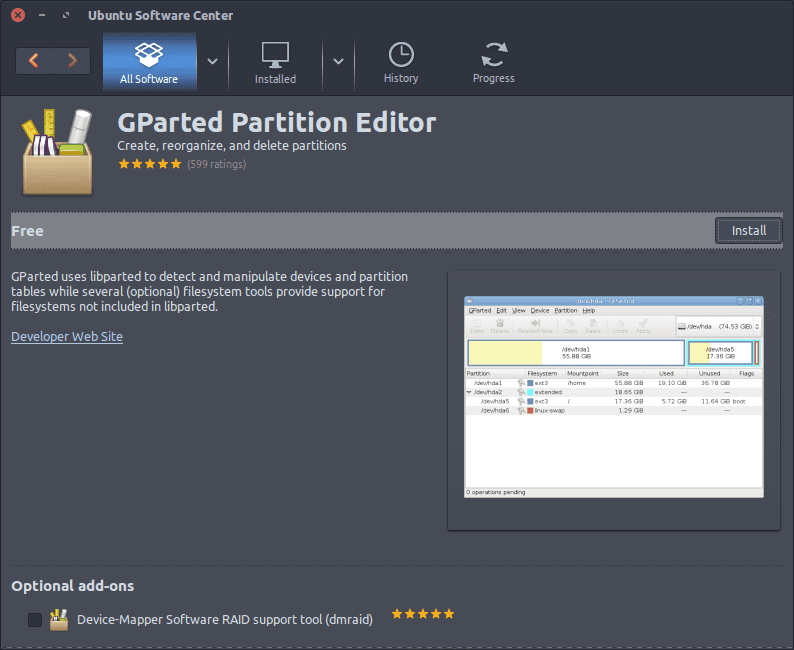
This theme has been inspired by Arc Dark Theme and the installation steps are as follows:
Install Arc Dark theme for Ubuntu Software Center
git clone https://github.com/mervick/arc-dark-software-center
cd arc-dark-software-center sudo bash install.sh
Uninstall Arc Dark theme for Ubuntu Software Center
sudo bash uninstall.sh
It is advisable to combine this theme of the software center with the Arc Dark theme in this way you will have a unique and pleasant style. We hope that this theme is to your liking and that it helps to further customize your facilities.
Are there good themes for Xubuntu?… How are they done?…
I don't like Ubuntu, I find it very unstable (I mean version 16.04 LTS).
I must say that This theme in Fedora Gnome is Excellent
¿?
Although the monkey dresses in silk ...
Hahahaha… I'm sorry. I am Archero and derivatives.